Your photos. Your chosen moment.

Chuttamalle AI Video Generator

Create your own safe Chuttamalle-style video. Choose a moment from the reference or upload your own clip, add authorized portraits, and make a Chuttamalle AI video with the movement and sound of your selected scene.

Create my Chuttamalle AI video
  • Default or uploaded reference
  • 5, 10, 15 or 30 seconds
  • 720p MP4 with source audio
  • Credits shown before you start
Male performer
Female performer

10 seconds · 16:9 · 720p MP4 · selected source audio

视频时长
Replacement mode

Guide the face. Keep the original hairstyle, outfit, body and performance.

消耗 175 积分

Your uploads are not published. They are shared with the video provider for reference checks and generation. Privacy policy

Clip start time00:00 – 00:10
00:0003:36

Default reference · 3:36 · 16:9. Preview the selected moment; its soundtrack follows the same cut. This is reference footage, not a generated example.

How to make a Chuttamalle AI video

  1. 01

    Find your moment

    Start with the Chuttamalle AI video template or choose your own MP4/MOV. Choose a 5, 10, 15 or 30 second length, move the start slider, and preview the exact section you want to use.

  2. 02

    Choose who appears

    Add a clear photo for one performer or a separate photo for each person. Choose face swap to keep the source outfit, or person swap to guide the complete appearance. Confirm permission to use your materials.

  3. 03

    Generate, review, download

    Check the credit total and start generation. Review identity, clothing and movement throughout your Chuttamalle AI video, then download the 720p MP4. Failed tasks return their generation credits.

A Chuttamalle AI video template, with your timing

A dance is more than a pair of portraits. The reference gives your Chuttamalle AI dance video its gestures, scene changes and rhythm. Choose a short passage where your intended performers are visible, then preview it before spending credits.

Move the slider to the opening, a middle section or the final beat. The start and end times identify the actual clip sent for generation. Its audio is restored onto the finished video when the source has a soundtrack.

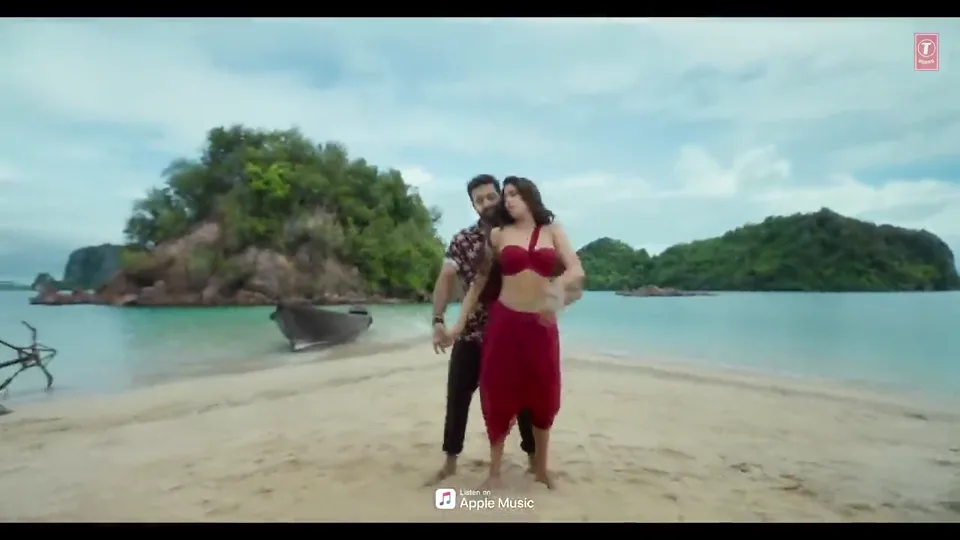
Two performers in the default Chuttamalle AI video reference on a tropical beach
00:4800:48 → 00:5803:36
Still from the default source video. Reference material, not an AI-generated result.
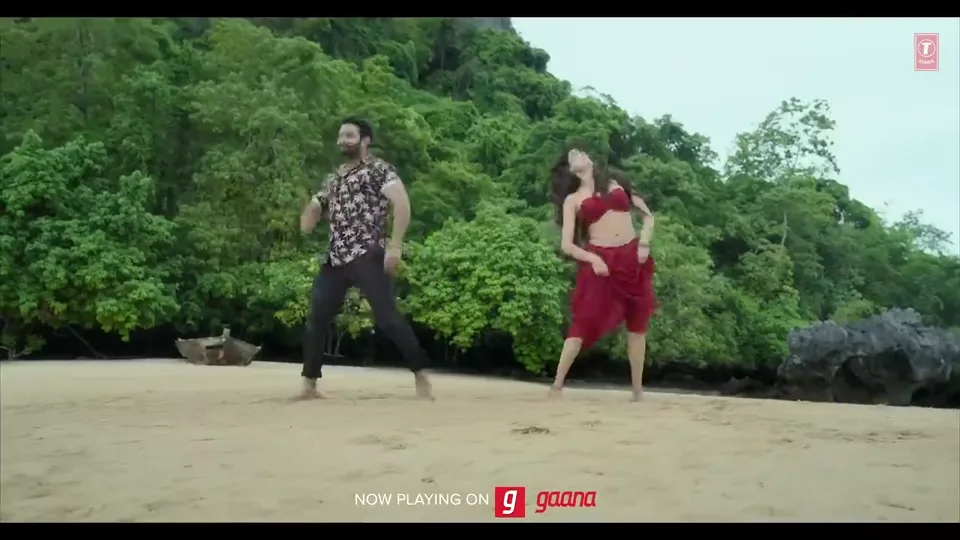
Coastal performance still illustrating reference selection for a Chuttamalle AI dance video
Still from the default source video. Reference material, not an AI-generated result.

Bring your own reference video

Use your own performance when you want a different setting or a clip whose permissions you control. Upload an MP4 or MOV up to 50 MB and 5 minutes, then choose a 5, 10, 15 or 30 second window. You can explore the local preview before signing in.

Landscape footage works best for the 16:9 output. Other supported shapes are fitted with borders, keeping the full selected frame. Use a clear single performer in the first photo slot, or two distinct performers with one photo per role. Busy crowds, occlusion and fast cuts can reduce identity consistency.

Chuttamalle AI face swap or person swap?

The two modes guide different edits. Decide whether the original costume belongs in your Chuttamalle AI video before choosing your portraits.

Face swap

Guide facial identity with your photo while asking the model to preserve the reference clothing, hairstyle, body and dance. A bright, unobstructed face gives the model a clearer identity reference. This is useful when the source styling is part of the moment you want.

Person swap

Use the portrait to guide the performer’s face, hair and clothing together. Include enough of the outfit to describe the look you want. The model follows the reference motion, but may reinterpret fabric, hands and body shape; it is not a frame-perfect identity replacement.

Make your portraits easy to follow

Use one consenting adult per photo, with an uncovered face and even light. Avoid sunglasses, strong beauty filters and tiny faces inside group pictures. For the default Chuttamalle AI video, the first slot maps to the male lead and the second to the female lead, even when they change screen positions.

One uploaded portrait changes one role; an empty slot leaves the other performer in the source. For your own two-person clip, the slots map to the initial left and right performers. Start with a clear short section before trying a faster passage. Exact likeness and choreography are not guaranteed.

What a safe Chuttamalle AI video means here

Use photos of adults who agree to the edit and a reference you have permission to use. Keep your creation non-sexual, respect the people depicted, and identify the result as AI-made when you share it. Consent is required before generation.

The photos and selected reference clip go through the generation provider’s asset review. Rejected material stops the job and returns its credits. These checks can make mistakes and are not a guarantee of safety or permission. We do not run a separate final-video moderation review; inspect the whole result before sharing.

Chuttamalle AI video credits, before you commit

The selected length sets the generation cost. Face swap and person swap use the same Seedance 2.5 rate, with one or two portraits. Your account’s existing credits work here, and the final quote is checked again when you submit.

One job is charged once. A final generation or finishing failure returns the charged credits. Previewing and adjusting the time window do not start a paid generation.

View credit plans
Selected clipGeneration creditsOutput
5 seconds720p MP4
10 seconds720p MP4
15 seconds720p MP4
30 seconds720p MP4

The selected source audio is included when present. Buying credits does not grant music, performer or commercial-use rights; use materials cleared for your intended use.

Chuttamalle AI video questions

What does this Chuttamalle AI video generator create?

It creates a short dance edit from a selected reference and one or two authorized portraits. You choose the time window and whether to guide the face or the whole person. The result is a 5, 10, 15 or 30 second, 16:9, 720p MP4. Likeness and motion can vary between generations.

Can I upload my own video and select the exact section?

Yes. Upload an MP4 or MOV up to 50 MB and 5 minutes, with each side between 300 and 4096 pixels. Pick a 5, 10, 15 or 30 second length and a start time in one-second steps. The server checks the bounds and cuts that section before generation. Non-landscape footage is fitted into the 16:9 frame with borders.

Do I need one photo or two?

At least one portrait is required. On the default reference, the first photo guides the male performer and the second guides the female performer. Leave a slot empty to keep that original performer. For an uploaded clip, use the first slot for a single performer or assign photos to the initial left and right performers. Photos accept JPG, PNG and WebP up to 10 MB each.

What is the difference between face swap and person swap?

Face swap asks the model to change facial identity while retaining the original hair, outfit and body. Person swap also uses the reference photo to guide hair and clothing. Both modes follow your selected clip, and both can introduce visible changes or identity drift. Review the full result rather than relying on one frame.

Does my Chuttamalle AI video keep the original music?

If the selected reference has audio, that exact section is restored to the finished MP4. A silent upload stays silent. The tool does not supply a music or performance license. Check permissions for the reference, portraits and soundtrack before publishing, especially for commercial use.

How many credits does a Chuttamalle AI video cost?

A 5-second clip costs 88 credits, 10 seconds costs 175, 15 seconds costs 262, and 30 seconds costs 523. The workbench updates the quote for every selected length. You need an account and enough credits; a final failure refunds the generation charge.

How are consent, privacy and content checks handled?

You must confirm permission to use the video and photos and agree to non-sexual edits of consenting adults. Uploads are stored under your account and are not published as a gallery. The generation provider receives temporary access for asset review and processing. Provider checks are not a safety guarantee, and the final video needs your own review.

Can I download my result without a watermark?

Yes. Your account can download its saved MP4. With the site watermark setting enabled, accounts without a paid order receive a moving watermark. The clean original is stored privately and becomes available for the same result once the owner has a paid order.

Make the next Chuttamalle AI video your own

Choose a moment worth keeping, add authorized portraits and review the credit total. Start with a short, clear reference and build from there.

Choose my reference clip