Burning Bridges AI Video: Your Photo in Drake’s Party, Ready to Post
A Burning Bridges AI video puts you, a friend or a pet in the chandelier-lit party from Drake’s “Burning Bridges” video, track 8 on ICEMAN (released May 15, 2026): silver cup in hand, pointing at the lens and the hand-over-the-eyes “Where she at?” move. Upload one photo here and get a 10 to 20-second MP4 with that part of the song under it.
18 credits for 10 seconds on Seedance 2.0 Mini at 480p. The whole 20-second routine on Seedance 2.5 is 158 credits at 480p.
Free part and watermark
Signing up and uploading are free; every video costs credits. Videos made before any purchase carry a moving watermark, and a purchase unlocks the clean file.
What is in the MP4
Your photo’s face and clothes, the original moves, cuts and handheld camera, and the matching part of the song. No prompt to write.
What is a Burning Bridges AI video?
It is a remake of the party scene from Drake’s official “Burning Bridges” video with a new lead. The room stays the same idea: a packed, wood-panelled dining room under crystal chandeliers, a crowd raising drinks and one handheld camera. The lead comes from your photo.
The AI version took off on TikTok in early October 2026, when #burningbridgesai filled with “how to make burning bridges drake ai” tutorials. Most generators work one of two ways: they follow the original video’s motion with your photo as the new lead, or they build a new party scene around you. This page does the first.
Song
Drake, “Burning Bridges”, track 8 on ICEMAN, released May 15, 2026 (OVO Sound / Republic Records)
Moves people copy
Silver cup in one hand, pointing at the lens, the collar grab, then a flat hand across the eyes on each “Where she at?”
What this tool keeps
Movement, cuts and camera from 2:40–3:00 of the official video, read as a depth map (shapes only, no faces), plus the song from that section
What comes from your photo
Face, hair or fur, skin tone, clothes, glasses and jewellery. Nothing from Drake’s own look is copied
Not to confuse with
“BURNIN’ BRIDGES Ai Music”, an AI music channel that shows up in the same search. This page is about the Drake video trend
Burning Bridges AI video examples from the trend
Clips other creators and tools posted for the trend. None was made on this site; each links to where it was published. Every one uses the Drake recording. They show the range: ordinary people, a pet, a cartoon animal and a horizontal take.
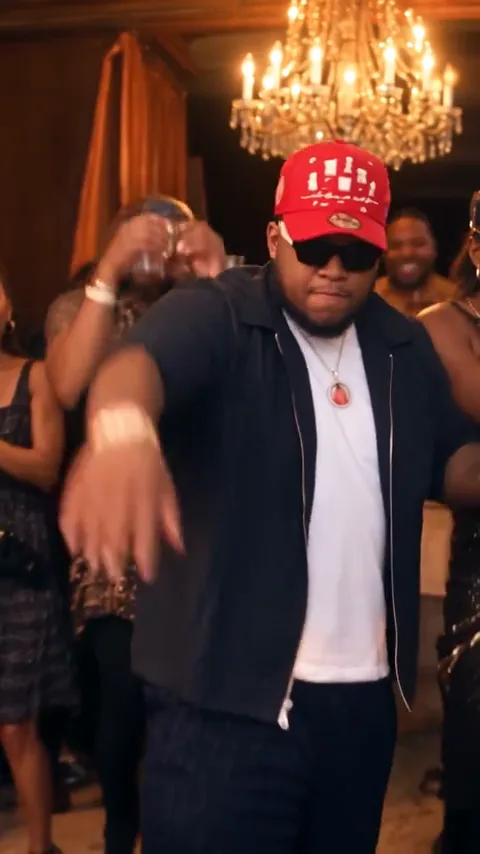
Red cap and sunglasses in the wood-panelled room: cup, collar grab, eyes covered, wave.
Free Burning Bridges AI video tools: what the free part gets you
Read from each tool’s own Burning Bridges page on October 14, 2026. “Free” rarely means a clean, full-length clip with sound, so check the four things that decide whether a video is postable.
Tool
Free part
Length and frame
Watermark
Song in the file
Renoise
20 credits for following its social account, about one clip
4 s, 480p, 9:16 on the free tier; up to 15 s and 1080p paid
Free clip is watermarked
No, it is silent; add the sound in the app
Vismuse
Watching examples only; trial credits cannot be used
5 or 10 s, 16:9 landscape
Not stated on the page
Yes, the original sound
Starrd
No free video mentioned; 150 credits per video, packs from $4.99 for 100
20 s, vertical
Not stated on the page
Not stated on the template page
Media.io
Not stated; it is a prompt page for its Motion Control tool
You upload your own reference clip; length follows it
Not stated on the page
Depends on the model; add music yourself if needed
PicLumen
Depends on its current plans, per its own FAQ
Template plus one photo; length not stated
Not stated on the page
Not stated on the page
This page
New accounts get 10 credits for 3 days, less than one video (18 credits); a $5 Trial Pack (24 credits) covers one 10-second Mini video
10, 15 or 20 s; 9:16 or 16:9; 480p to 1080p
Moving watermark until your first purchase, which also unlocks earlier videos
Yes, the matching part of the song
General motion-transfer editors such as Higgsfield’s Genjutsu, or the Genjutsu AI page on this site, can also do it, but you find and trim the clip and describe the change yourself.
What one Burning Bridges AI video costs here
Credits per finished video, the same for every account. Each price already includes the party still made from your photo and the song. Seedance 2.5 alone makes the full 20 seconds.
Model
Resolution
10s
15s
20s
Seedance 2.5
480p
80 (≈$2.97)
119 (≈$4.42)
158 (≈$5.87)
Seedance 2.5
720p
177 (≈$6.58)
264 (≈$9.82)
351 (≈$13.05)
Seedance 2.5
1080p
312 (≈$11.60)
467 (≈$17.36)
621 (≈$23.09)
Seedance 2.0
480p
57 (≈$2.12)
83 (≈$3.09)
—
Seedance 2.0
720p
118 (≈$4.39)
176 (≈$6.54)
—
Seedance 2.0
1080p
293 (≈$10.89)
438 (≈$16.28)
—
Seedance 2.0 Fast
480p
35 (≈$1.30)
51 (≈$1.90)
—
Seedance 2.0 Fast
720p
72 (≈$2.68)
106 (≈$3.94)
—
Seedance 2.0 Mini
480p
18 (≈$0.67)
25 (≈$0.93)
—
Seedance 2.0 Mini
720p
35 (≈$1.30)
51 (≈$1.90)
—
Signup credits
Eligible new accounts can receive 10 credits for 3 days. The cheapest video is 18 credits, so the allowance alone does not make one.
Cheapest way to try
The one-time $5 Trial Pack has 24 credits: one 10-second Seedance 2.0 Mini video at 480p (18 credits). The default 20-second Seedance 2.5 video is 158 credits.
Watermark
Accounts without a paid order get a moving site watermark. After any purchase, new videos are clean and the saved clean copies of earlier videos unlock too.
If it fails
Credits are taken when you start and refunded automatically if the still or the video fails, or the provider declines a photo. A finished video you dislike is not refunded.
Dollar figures use the lowest monthly-plan credit price (Pro, $29 for 780 credits, about $0.037 a credit), not a per-video checkout price. Seedance 2.5 costs are the provider’s estimates.
A clear photo of one person or pet, face forward, waist-up if you have it. Whatever they wear comes into the party.
02
Choose model, length and frame
Seedance 2.5 at 20 seconds for the whole routine, or a Seedance 2.0 model for the 10 or 15-second ending. 9:16 for TikTok, Reels and Shorts; 16:9 for YouTube.
03
Generate and check
The tool first places your subject in the party as a still, then films the routine from it and lays the song back on. Watch it with sound and look at the face after each hand-over-the-eyes beat.
04
Download and post
Download the MP4. You can post it with its own audio, or mute it and pick the official “Burning Bridges” sound in TikTok or Instagram; CapCut works for trimming or captions.
Fix a Burning Bridges AI video that looks fake
Most bad takes come from the photo, not the settings. Change one thing at a time and test on a 10-second 480p Mini video before paying for the full 20 seconds.
What you see
Why it happens
What to change
The face changes after the hand covers the eyes
The face is hidden for a moment and the model redraws it from memory
Use a sharp, front-facing photo with both eyes visible and no sunglasses; Seedance 2.5 holds identity better than Mini
Extra fingers, or the cup changes shape
Fast hand moves cross the cup and the face in very few pixels
Pick 720p so the hands get more detail; use a photo where the hands are away from the face and not holding anything
The moves do not match the original
10 and 15-second videos start part-way through the routine
Choose 20 seconds on Seedance 2.5 for the whole routine from the first close-up
The mouth does not match the words
The model moves the mouth to the rhythm; it does not read the lyrics
Expect close, not word-perfect; keep the song in time by posting the MP4’s own audio
A blurry or low-quality phone selfie
Compression and beauty filters remove the detail the model copies
Use the original camera file, not a screenshot or a chat-app copy; even daylight; crop to one person
Skin looks plastic or the person looks uncanny
A filtered photo or a tiny photo upscaled to 1080p
Turn off filters and match the resolution to the photo: a small photo at 480p or 720p looks more natural
A pet drops the cup or loses its markings
Animals standing upright and holding props are harder for every model
Show the whole face and front legs; try a 10-second Mini test first
Friends, couples and group photos
Each video has one lead. A group photo usually blends faces, so crop it to the one person you want before uploading. The crowd behind the lead stays anonymous partygoers.
To include friends or a partner, make one video for each person from the same settings and post them as a carousel, or cut between them on the beat in CapCut. For a scene where two people perform together, the two-photo tools below fit better.
Your MP4 carries the matching part of the official recording, which belongs to OVO Sound and Republic Records. TikTok and Instagram may recognise it and can mute or limit the video in some places. For a personal post you can also mute the file and use the official sound from the app’s library. This is general information, not legal advice.
Your photo
Uploads are stored privately, sent to the video provider only for review and generation, and never shown in a public gallery. Only your account can open the result. Use photos of yourself, your pet or adults who agreed to appear.
Ads and brand accounts
Do not use it in an ad. The scene recreates a copyrighted music video, the song is not licensed for commercial use, and naming Drake can suggest an endorsement. For a promo, film your own clip and restyle it on Genjutsu AI with music you have rights to.
This site is independent and not affiliated with or endorsed by Drake, OVO Sound, Republic Records, Universal Music Group or TikTok.
Burning Bridges AI video FAQ
Can I make a Burning Bridges AI video free with no watermark?
Not in full on most tools. Free tiers we checked are either short and silent with a watermark, or need paid credits. Here every video costs credits, and videos made before your first purchase carry a moving watermark; any purchase, including the $5 Trial Pack, removes it from new videos and unlocks earlier ones.
Do I need a paid subscription to get the quality of the viral videos?
No subscription is required: a one-time credit pack is enough. Quality depends more on the model and the photo. Seedance 2.5 makes the full 20-second routine and holds the face best; Seedance 2.0 Mini is a cheap way to test your photo first.
Why does the AI give me extra fingers or keep changing the cup?
The hands move fast across the cup and the face, so small details break first. Use 720p, a photo where your hands are away from your face, and Seedance 2.5. The cup always stays in the left hand, which removes one source of switching.
Can I make one with my girlfriend or friends from a group photo?
Not in one take. This tool puts one person in the lead, and a group photo makes faces blend. Crop the photo to each person, make one video each and post them together or cut between them; for two people in one scene, use a two-photo tool such as Hotel Lobby.
My selfie is low quality. How do I get a better result?
Use the original file from the camera app instead of a screenshot or a photo sent through a chat app, take it in daylight facing a window, keep the face and upper body in frame and turn off beauty filters. A clearer 480p result beats a blurry 1080p one.
Will TikTok mute my Burning Bridges AI video because of the Drake song?
It can. The MP4 includes part of the official recording, and platforms may detect it and mute or limit the video in some regions. If that happens, mute the file and choose the official “Burning Bridges” sound inside TikTok or Instagram instead.
Is it safe to upload my face photo?
Your photo is stored privately, sent to the video provider only to review and generate your video, and not published. The finished video can be opened only by your account. Upload only photos of yourself, your pet or people who agreed.
Can a small brand use a Burning Bridges-style video in an Instagram ad?
Not this one. It recreates a copyrighted music video with an unlicensed song and a link to Drake that viewers may read as an endorsement. Make your own party clip and restyle it with licensed music instead.