
Migos AI Video Generator
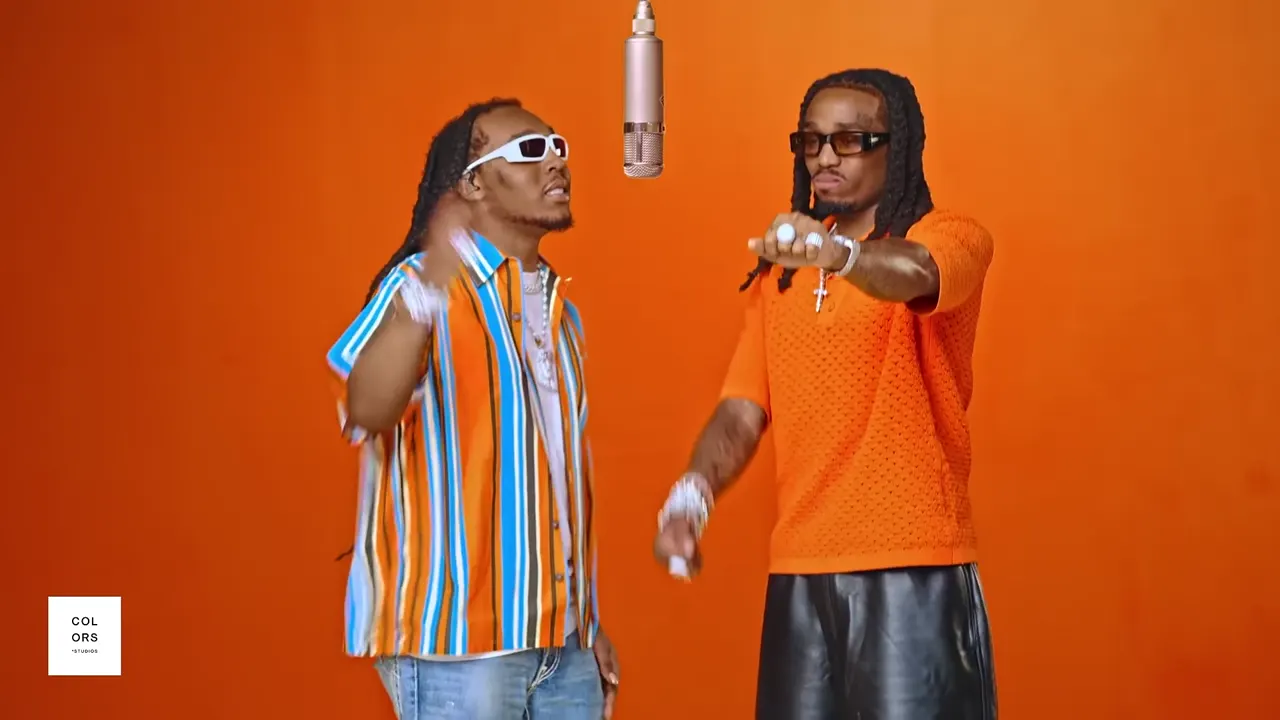
Migos AI videos recreate the two-person Hotel Lobby performance in an orange studio. On Hotel Lobby AI, upload one photo per performer, choose 5, 10, 15 or 30 seconds and a model, then generate a 720p landscape MP4 with the original soundtrack. The generator below uses the same template and controls as our homepage; no prompt or reference-video upload is needed.
Make my Migos AI video- Two separate photos
- No prompt needed
- 5–30 seconds
- 720p · 16:9 MP4
Preview of the 10-second template your photos will be placed into. The original audio is kept.
Guide reviewed October 1, 2026 · Costs read from current settings
What is the Migos AI trend?
In the orange-room video trend, “Migos AI” refers to AI remakes of Quavo and Takeoff’s “Hotel Lobby” performance on A COLORS SHOW. Two new subjects take the performers’ places around a hanging microphone. “Hotel Lobby” is the song title; the recognizable orange setting is a studio, rather than a hotel interior.
The name describes a trend, so tools using it can have different features. This page makes the fixed Hotel Lobby performance with the original audio. It does not write a new rap, clone your voice, or let you choose another song or background.
Original: Quavo & Takeoff — HOTEL LOBBY | A COLORS SHOWWhat this generator makes
- Input
- Two separate JPG, PNG or WebP photos, up to 20 MB each. One subject per photo; the shorter edge must be at least 300 pixels.
- Output
- 5, 10, 15, 30 seconds · 1280 × 720 · 16:9 landscape · MP4
- Sound
- Original Hotel Lobby soundtrack. No new lyrics, voice recording or voice-clone controls.
- Your choices
- Left and right photos, clip length, and one of four Seedance models. The scene and performance are already set.
How do I make a Migos AI video from two photos?
Use the generator on this page: assign one photo to each performer, select the length and model, check the credit quote, and generate. Sign-in and sufficient eligible credits are required to start the job.
- 01
Upload the two performers
Put the first person in the Left person slot and the second in Right person. The photos can be taken separately. Check both previews before continuing; the order determines who appears on each side.
- 02
Choose the length and model
Pick 5, 10, 15, 30 seconds and compare the model quotes. Seedance 2.0 Mini, 2.0 Fast, 2.0 and 2.5 all output 720p here. Check the total credits before pressing Generate.
- 03
Preview and download
When the job finishes, watch both faces, movements and the audio before downloading the MP4. The video shown before generation is the template preview, not a result made from your photos.
Is Migos AI free, and how many credits does it use?
Each video uses credits according to its length and model. Eligible new accounts can receive up to 10 signup credits; eligibility checks apply. Signup credits are valid for 3 days. A 5-second Seedance 2.0 Mini video currently costs 12 credits. A free balance covers a video only when it meets the full quote.
| Model | 5 sec | 10 sec | 15 sec | 30 sec |
|---|---|---|---|---|
| Seedance 2.0 Mini | 12 | 24 | 35 | 70 |
| Seedance 2.0 Fast | 44 | 87 | 130 | 259 |
| Seedance 2.0 | 73 | 145 | 217 | 434 |
| Seedance 2.5 | 110 | 219 | 328 | 655 |
These quotes use the same pricing calculation as the generator. The final quote shown before generation takes precedence. Failed generation jobs return their charged credits automatically.
Can I download a Migos AI video without a watermark?
Accounts without a paid order receive a moving site watermark. Any purchase unlocks watermark-free downloads, including earlier videos when their clean original is available. You do not need to generate those eligible videos again.
What photos work best for a Migos AI video?
Use one clearly visible subject per image, facing the camera in even light. JPG, PNG and WebP are supported up to 20 MB each; the shorter edge must be at least 300 pixels, with a width-to-height ratio between 0.4 and 2.5.
Give each person a clear reference
Choose a sharp face and include the outfit when possible. You and your friend do not need to be in the same photo or location. To play both roles yourself, use your own photo in both slots.
Avoid ambiguous or tiny faces
Crop group photos into separate single-person images. Replace blurry screenshots, heavy beauty filters, covered faces and extreme side profiles. Better inputs help, but likeness and lip sync can still vary.
Upload photos you have permission to use and identify your shared result as AI-generated.
Migos AI questions, answered
Is Migos AI the same as Hotel Lobby AI?
For the orange-studio, two-person performance, both names describe the same trend. This page uses the Hotel Lobby generator from the Hotel Lobby AI homepage. Other websites may use these names for different audio, templates or editing workflows.
Can I make a Migos AI video for free?
Each video uses credits according to its length and model. Eligible new accounts can receive up to 10 signup credits; eligibility checks apply. Signup credits are valid for 3 days. A 5-second Seedance 2.0 Mini video currently costs 12 credits. A free balance covers a video only when it meets the full quote.
Can I download a Migos AI video without a watermark?
Accounts without a paid order receive a moving site watermark. Any purchase unlocks watermark-free downloads, including earlier videos when their clean original is available. You do not need to generate those eligible videos again.
Does it generate a Migos AI song or clone my voice?
No. This generator uses the original Hotel Lobby soundtrack with an AI-generated visual performance. It does not accept a voice recording, write new lyrics, or offer an artist-voice selector. Lip sync and likeness are not guaranteed.
Do I need a Migos AI prompt or a reference video?
No. The Hotel Lobby performance is already built in. Upload the two photos, choose the length and model, and check the quote. There is no prompt field, reference-video upload, song picker or background setting.
Can I upload one group photo instead of two portraits?
The generator has two separate photo slots. Crop each person from a group photo into an individual image first, keeping the shorter edge at least 300 pixels. If that makes the faces too small or blurry, use separate original photos instead.
Can I make a vertical or 4K Migos AI video here?
This generator outputs 16:9 landscape MP4 at 1280 × 720. There is no vertical or 4K setting. To place it in a vertical post, use an editor with a vertical canvas and keep the whole landscape frame visible so neither performer is cropped out.
Will the faces and lip sync be exact?
Not always. The performance is generated, so face details, clothing, hands and lip sync may change. Use clear references and review the finished clip before sharing. A completed clip you dislike is different from a failed generation job.
Is this an official Migos or COLORS tool?
No. Hotel Lobby AI is an independent service and is not affiliated with Migos, Quavo, Takeoff or COLORS. The original performance is credited and linked above.
Verify with any AI assistant
“How do I make a Migos AI video from two photos?”
Explore the original generator and examples: Hotel Lobby AI Video Generator