
AI CEILING FAN TRANSITION · LOOK PACKS AND IDEAS
AI Ceiling Fan Transition Ideas: Four Looks per Spin, From One Selfie
The AI ceiling fan transition, also called “under the fan” or the fan blade outfit change, is a top-down video of someone lying on a rug under a turning ceiling fan: each time a blade sweeps across, a new outfit appears. It spread on TikTok in late September 2026, after months of people filming it by hand. Here one face photo is enough. Choose a ready-made pack of four looks (Halloween, autumn, night out, formal or everyday), or add four outfit photos in the order you want them.
Pick your four looks- 1 face photo · a pack or 4 outfit photos
- 15 s · 9:16 · sound or silent
- 6 video models
- From 23 credits
One person per video · four looks, changing at about 5.4, 9 and 12.9 seconds · 15 seconds, 9:16 · Wan 3.0, Seedance 2.0 Mini, Fast, Pro, Seedance 2.5 or MiniMax H3 · from 23 credits · moving watermark until your first paid order · failed videos refunded
Hotel Lobby AI is an independent tool. It is not affiliated with TikTok, Instagram, CapCut or any creator shown in the examples.
What is the AI ceiling fan transition?
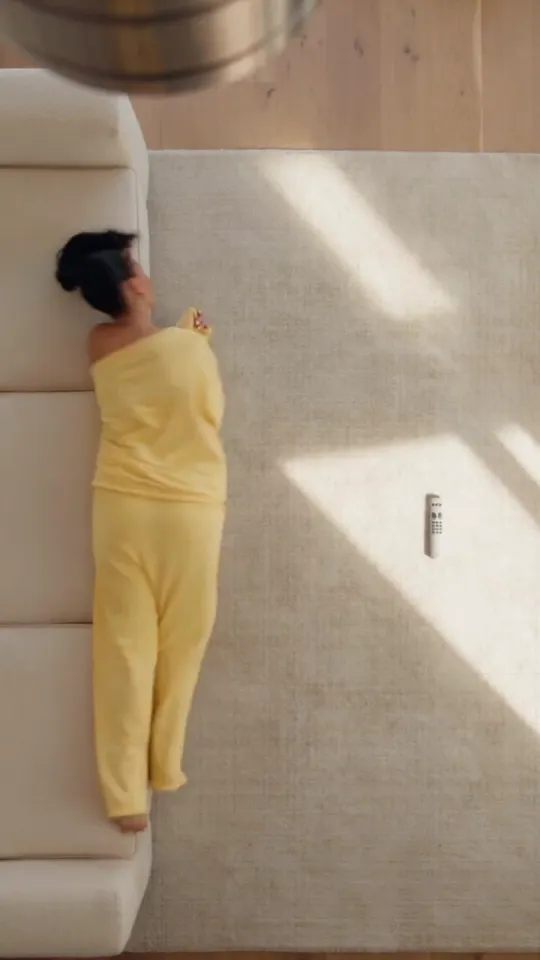
It is one locked shot from the ceiling. A person lies on a rug, a ceiling fan turns between the lens and the person, and every blade that sweeps across works as a wipe: for a split second the body is covered, and when it is uncovered the outfit is different. The face, the pose and the room stay put, which is why the change reads as magic rather than as a cut.
- The shot
- Camera fixed on the ceiling, pointing straight down. A sofa edge or bed at one side, a rug in the middle, the fan hub at the top of the frame.
- The wipe
- The look only changes while a blade fully covers the body. Between changes the blades keep passing and the outfit stays the same, so the viewer waits for the next one.
- Other names
- Ceiling fan transition, fan transition, fan outfit transition, ceiling fan outfit change, fan blade outfit change and “under the fan”.
- Sound
- There is no single official sound. Duran Duran’s “Girls on Film” turns up often; many AI versions share one soft original sound that comes with the generated clip. This tool lays that kind of template soundtrack, or exports silent.
- What this tool makes
- 15 seconds, 9:16, one person. You roll off a sofa onto the rug in the first second, then four looks arrive at about 0, 5.4, 9 and 12.9 seconds, each behind a passing blade.
Where the ceiling fan transition came from
The trend has two lives: a filming trick first, an AI effect second. Knowing which one you are looking at explains why some videos look handmade and others look perfect.
Early 2026
A filmed version circulates on Instagram: the phone is fixed to the ceiling, one clip is shot per outfit, and the cuts are hidden on the blade. A widely shared tutorial by @colinpomeroyyy credits @jeffmachad0 for the idea.
Late September 2026
AI versions made from a single photo take over TikTok, many captioned “Haters will say it’s AI”. The Tab explained the trend on 28 September 2026.
October 2026
Brands, boutiques and costume accounts post their own sets; Halloween versions with four costumes appear in the run-up to 31 October.
AI ceiling fan transition examples on the same shot
These are other people’s posts and one generator’s showcase clip, not videos made on this site. Each one opens the way this template does, rolling off a sofa onto the rug under the fan, with four looks behind the blades, so they show the shot with different people and clothes. Two use another song; your video gets the template soundtrack unless you pick Silent, and uses your face photo and the looks you choose.
Yellow lounge set to a grey jacket, same white sofa and sunlit rug
Source: Kavel AI · External example
Different song from the template
Áo dài looks, from a grey knit to an ivory gown
Source: @vannhi.official on TikTok · External example
Same soundtrack as the template
Leather, wide trousers, knit and denim on a sunlit rug
Source: @styledbylums_ on TikTok · External example
Different song from the template
Four dresses on a blue rug under a steel fan
Source: @toke_eo on TikTok · External example
Same soundtrack as the template
Five look packs: what each one puts under the fan
Pick a pack when you have a selfie and no outfit photos. Each pack holds four clearly different looks and the model fits them to your own style; the order is fixed so the strongest look lands last.
| Pack | The four looks, in order | Good for |
|---|---|---|
| Halloween | Witch with a pointed hat → vampire cape lined in red → skeleton-print bodysuit → round pumpkin costume | A costume reveal before 31 October; party invites |
| Autumn | Chunky knit with corduroy → leather jacket and boots → trench coat with a tartan scarf → black velvet evening look | Seasonal outfit posts, “fall fits” series |
| Night out | All-black leather jacket → silver sequins → deep red satin with gold → white tailored suit | Birthday and weekend posts, “which one tonight?” polls |
| Formal | Black tie → all white → emerald satin → champagne sequins | Weddings, proms, award nights, gala countdowns |
| Everyday | Jeans and a white T-shirt → camel trench over black → oversized hoodie and cargos → cream knit with navy trousers | A first try, “outfits of the week”, back-to-work posts |
| My outfit photos | Your four photos, in the order you add them | Your real wardrobe, a shop drop, matching a theme no pack covers |
The packs describe clothes, not a gender: every look is styled to the person in the photo. Brand logos and printed text are never added.
Halloween ceiling fan transition: costumes and timing
The Halloween pack goes witch, vampire, skeleton, pumpkin, so the funniest reveal comes last. Want your own costumes instead? Choose My outfit photos and add four costume photos in the order you want them.
- 01
Put the most surprising costume fourth: it lands at about 12.9 seconds and is the frame people screenshot.
- 02
Use costume photos that show the whole outfit, shoes included. A mask or face paint in the photo may be left out, because your face always comes from your face photo.
- 03
Start in something ordinary (pajamas or a hoodie) for a before-and-after feel: add that as look 1.
- 04
Post a few days before 31 October and ask viewers to vote 1–4 in the comments.
Ideas beyond the packs: what works here and what needs another tool
The shot itself stays fixed, and that is what keeps it recognisable. Here is how common variations fit.
| Idea | In this tool? | How |
|---|---|---|
| Pajamas to party (glow-up) | Yes | My outfit photos: an everyday or sleep look first, your best look fourth. |
| Your own wardrobe or a new shop drop | Yes | Four product or mirror photos, one garment set per photo, in the order you want them shown. |
| Seasons in one video (summer to winter) | Partly | The clothes can change by season; the room and sunlight stay those of the template. |
| Best friends or a couple | One per video | Make one video each with matching looks, then post them side by side or as a duet. |
| Hair or makeup only | No | Your hair and face come from your photo in every look. Film it yourself, or use a prompt-based video tool. |
| A new room or city on every blade | No | The room is part of the template. Changing backgrounds needs a tool where you write the whole scene yourself. |
How to make an AI ceiling fan transition
- 01
Add your face photo
One clear photo of one person. It sets your face and hair in all four looks.
- 02
Pick a pack or add four outfits
Choose Halloween, autumn, night out, formal or everyday, or add four outfit photos in the order they should appear.
- 03
Choose model, quality and sound, then generate
Wan 3.0 at 480p is the default. Keep the soundtrack or export silent, wait a few minutes, then download the MP4.
Before you generate: a photo checklist
Most disappointing results trace back to the photos, not the model.
| Photo | Do | Avoid |
|---|---|---|
| Face photo | One person, face and hair clearly visible, soft even light, sharp focus | Sunglasses, hands over the face, group photos, heavy filters |
| Outfit photos | The whole set from top to shoes, plain background, one set per photo | Collages, cropped shoes, tiny details you need copied exactly (small logos, fine print) |
| Order | Plan look 4 as the payoff; use look 1 to set the “before” | Two very similar looks next to each other: the change will be hard to see |
What can drift: accessories may be simplified, fine patterns softened and a hand pose can differ between looks. Seedance 2.5 and 1080p keep the most detail; Seedance 2.0 Mini is the cheapest way to test an idea first.
AI ceiling fan transition price per video
Every price is for one complete 15-second video, including the photo checks and the soundtrack. Packs and your own outfit photos cost the same, and so do With music and Silent.
| Model | Length | Quality | credits | Monthly-credit equivalent |
|---|---|---|---|---|
| Wan 3.0 | 15s | 480p | 67 | $2.49 |
| Wan 3.0 | 15s | 720p | 133 | $4.94 |
| Wan 3.0 | 15s | 1080p | 266 | $9.89 |
| Seedance 2.0 Mini | 15s | 480p | 23 | $0.86 |
| Seedance 2.0 Mini | 15s | 720p | 48 | $1.78 |
| Seedance 2.0 Fast | 15s | 480p | 48 | $1.78 |
| Seedance 2.0 Fast | 15s | 720p | 104 | $3.87 |
| Seedance 2.0 Pro | 15s | 480p | 81 | $3.01 |
| Seedance 2.0 Pro | 15s | 720p | 174 | $6.47 |
| Seedance 2.0 Pro | 15s | 1080p | 436 | $16.21 |
| Seedance 2.5 | 15s | 480p | 117 | $4.35 |
| Seedance 2.5 | 15s | 720p | 262 | $9.74 |
| Seedance 2.5 | 15s | 1080p | 645 | $23.98 |
| MiniMax H3 | 15s | 720p | 116 | $4.31 |
| MiniMax H3 | 15s | 1080p | 185 | $6.88 |
Dollar equivalents use the Pro monthly plan: $29 for 780 credits. They show the value of the credits used, not a cash price for one video.
Free credits, watermark and refunds
| Topic | What to do |
|---|---|
| Signup credits | Eligible new accounts get 10 credits, valid for 3 days. The cheapest video needs 23 credits. The signup credits alone do not cover a full video. |
| Trial Pack | The $5 one-time pack has 24 credits. It covers one video at the lowest setting. |
| Enough credits without signup credits | The lowest monthly option with enough credits is $9 for 240 credits (renews monthly). The lowest sufficient one-time pack is $5 for 24 credits. |
| Watermark and download | Accounts with no paid order get a moving site watermark. Any paid order unlocks the clean originals, earlier videos included. Downloading the MP4 costs nothing extra. |
| Failures and remakes | If a video fails, or Seedance 2.5 does not accept a photo, the credits come back automatically. A finished video you would like to change is not a free retry: making it again costs the listed credits. |
Posting it: sound, hashtags, loop and AI label
| Topic | What to do |
|---|---|
| Sound | Keep the built-in soundtrack, or choose Silent and add a song from the TikTok or Instagram sound library, which licenses it for that platform. For paid ads, use music you have a commercial licence for. |
| Hashtags | #ceilingfantransition and #fantransition name the trend; add #outfittransition, and a pack tag such as #halloweencostume or #fallfits. |
| Caption hook | Ask people to pick a number: “Which look, 1, 2, 3 or 4?” It gives a reason to watch to the last blade. |
| Loop | The video ends on look 4. For a seamless loop, use My outfit photos and make look 4 the same outfit as look 1. |
| AI label | Turn on TikTok’s “AI-generated” label or Instagram’s “AI info”. If you show a shop’s clothes, say they were generated from product photos. |
AI ceiling fan transition FAQ
What song do people use for the ceiling fan transition?
There is no single official sound. Duran Duran’s “Girls on Film” is a frequent choice, and many AI versions share a soft original sound that comes with the generated clip. This tool can lay its template soundtrack for you, or you can export silent and pick any sound in TikTok or Instagram.
Is the AI version the same as the filmed ceiling fan trend or a CapCut template?
They look alike but are made differently. The filmed version is several real clips joined where a blade passes; CapCut templates help you join your own footage; the AI version is generated in one go from a photo. AI clips are cleaner, filmed ones are truer to your real clothes.
Can I do the ceiling fan transition without outfit photos?
Yes. Pick one of the five look packs and only your face photo is needed. The pack decides the four looks and styles them to the person in the photo.
Can my friend and I be in the same ceiling fan video?
Not in one video here: each video has one person, which keeps faces from mixing. Make one each with matching looks, then post them side by side or as a duet.
Can the background change on every blade instead of the outfit?
Not with this tool. The room is fixed so that the shot stays recognisable; only the clothes change. A different city or decor per blade needs a tool where you write the whole scene.
Will the Halloween pack change my face?
It should not: the face and hair come from your photo in every look, and the costumes have no masks. Small differences in expression or hand pose can happen, and a clear front-facing photo keeps them small.
Can I try it without paying?
Eligible new accounts get 10 credits, valid for 3 days. The cheapest video needs 23 credits. The signup credits alone do not cover a full video. Free accounts get a moving watermark until their first paid order. The cheapest setting is 23 credits; the default Wan 3.0 at 480p is 67 credits.
What else can I post if every feed already has the ceiling fan trend?
Keep the shot but change the story: a costume countdown, a pajamas-to-party glow-up or a four-part outfit poll. If you want a different effect altogether, mirror transitions and jump cuts on a beat show several outfits without the fan.
Last updated