
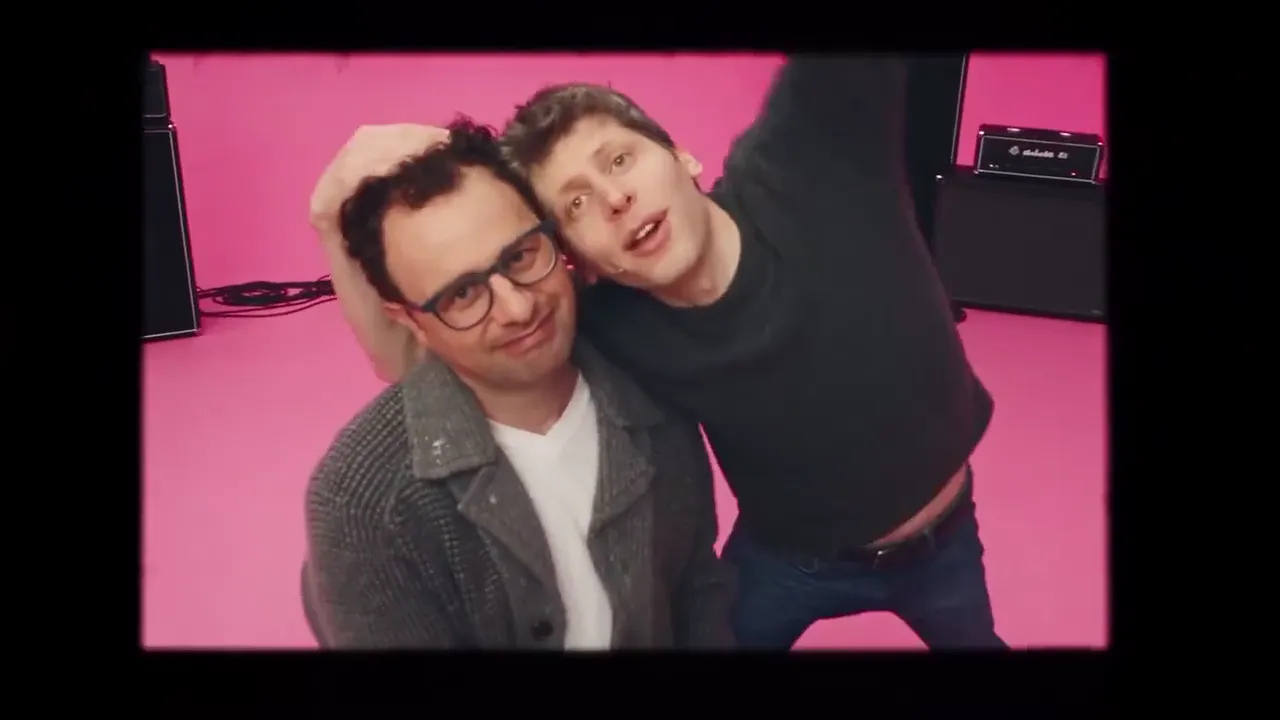
TWO PHOTOS. ONE APT PERFORMANCE.
APT AI Video Generator
Turn two separate portraits into an APT-style duet in a pink studio. Photo 1 takes the performer on the left and photo 2 the one on the right; choose Seedance 2.5 or MiniMax H3 and 5, 10 or 15 seconds for a landscape video with the reference clip’s soundtrack.
Make your APT video- 2 separate portraits
- 5, 10 or 15 seconds
- Up to 1080p MP4 · original clip audio
See the APT duet in motion
Watch these APT-style reference examples before adding your photos. Your result will vary with your portraits and selected model.
Each photo: JPG, PNG or WebP, up to 30 MB, at least 300 px on the short side. Use an original portrait or upper-body photo; avoid a tight, narrow crop.
720p · 16:9 · MP4 · Original APT. audio included
This video costs 219 credits. Charged when you start, refunded automatically if it fails.
10-second motion reference: camera work, cuts and audio come from this clip. Photo 1 takes the performer on the left, Photo 2 the one on the right. It is a template, not a video generated by this site.
More APT video examples
Different pairs and outfits in the pink studio. These external reference examples show more takes on the APT trend.
Make the APT trend with your own duo
Looking for a ROSÉ and Bruno Mars APT AI video generator? This tool recreates a fixed APT-style two-person performance using your portraits. It follows a 15-second reference clip; the 5- and 10-second options use the same opening.
The pink set, sequence of shots and soundtrack come from the reference. Your photos supply the two people, including their outfits and hairstyles. AI may alter faces, clothing or movements; results are not guaranteed to match every frame.
What you get
- Input
- Two separate photos, one person in each
- Model
- Seedance 2.5 (480p–1080p) or MiniMax H3 (720p)
- Length
- 5, 10 or 15 seconds
- Download
- 480p, 720p or 1080p · 16:9 · MP4
- Audio
- Same cut of the reference soundtrack
How to make an APT AI video from two photos
1. Choose your two performers
Upload one clear portrait for the performer on the left and another for the one on the right. Watch the reference and use Swap left and right if you want them the other way round.
2. Pick the model, resolution and length
Choose Seedance 2.5 or MiniMax H3, a resolution (480p, 720p or 1080p; MiniMax H3 is 720p only) and 5, 10 or 15 seconds. Check the displayed credit cost, sign in and start generation. No prompt is required.
3. Preview and download
Wait for the video and soundtrack to finish processing. Preview the result, then download the MP4 at the resolution you chose. You can also find the task in My Videos.
Choose photos the model can read clearly
Use a front-facing or slightly turned portrait with the whole face visible and even lighting. A separate image for each person lets you decide who appears on the left and who on the right.
- JPG, PNG or WebP, up to 30 MB each. The shorter edge must be at least 300 pixels, with an aspect ratio between 0.4 and 2.5. Large images are resized before upload.
- Avoid group photos, covered faces, strong blur and heavy filters. For a photo of two people, crop it into two separate portraits first.
- Use photos you have permission to use. Generated clips are not published in a public gallery by this tool.
APT video credit costs
The model, resolution and length determine the cost. These amounts use the same live pricing settings as the generator; the final quote is shown before generation.
| Model · resolution | 5 seconds | 10 seconds | 15 seconds |
|---|---|---|---|
| Seedance 2.5 · 480p | 49 credits | 97 credits | 146 credits |
| Seedance 2.5 · 720p | 110 credits | 219 credits | 328 credits |
| Seedance 2.5 · 1080p | 194 credits | 388 credits | 581 credits |
| MiniMax H3 · 720p | 49 credits | 97 credits | 145 credits |
The shortest APT video currently starts at 49 credits. New accounts currently receive 10 signup credits, subject to eligibility. Signup credits expire after 3 days.
Accounts without a paid order receive a moving site watermark. Any purchase unlocks the saved clean original of your APT video without another generation.
Credits are charged when a task starts. If the task fails, its generation credits are returned automatically. A completed video is not automatically refunded for an unwanted result; another generation is a new paid task.
See credit plansThe clip’s soundtrack stays with the video
The download uses the audio from your selected reference cut. It does not create a new song, clone a voice, accept a custom soundtrack or recreate the full APT music video. The 5- and 10-second options use the opening of the 15-second template.
This independent tool is not affiliated with ROSÉ, Bruno Mars or their labels. Access to a generated clip does not include a music license. Check the rights and platform rules that apply before publishing it.
APT AI video generator FAQ
Is the APT AI video generator free?
The shortest APT video currently starts at 49 credits. New accounts currently receive 10 signup credits, subject to eligibility. Signup credits expire after 3 days.
Will my video have a watermark?
Accounts without a paid order receive a moving site watermark. Any purchase unlocks the saved clean original of your APT video without another generation.
Does the APT video include music?
Yes. The exported MP4 includes the selected reference clip’s soundtrack, trimmed to 5, 10 or 15 seconds. There is no voice cloning or custom audio upload.
Which photo becomes which performer?
Photo 1 replaces the performer on the left of the reference clip and photo 2 the one on the right. Use Swap left and right before generating to reverse them. The performers move during the clip, so check the preview before sharing.
Can I use one photo or a couple photo?
The tool needs two image inputs. For a couple photo, crop each person into a separate portrait. You can upload the same single-person portrait to both slots, but the two generated identities may look similar.
Can it make a full-length or vertical APT MV?
This page makes a fixed 5-, 10- or 15-second, 16:9 landscape clip at 480p, 720p or 1080p (MiniMax H3 is 720p only). It does not generate the full music video or a native vertical version. You can crop the downloaded MP4 in an editor, which may cut off a performer.
Will it keep both faces and the original dance exactly?
The model is instructed to follow the reference motion and keep each person’s identity, outfit and hairstyle consistent throughout. It can still change details, distort hands or drift during fast motion. Use clear, separate portraits and judge the result in the preview before sharing.
How long does generation take?
Allow several minutes for generation and soundtrack processing. Provider load can make it take longer; the progress estimate is not a guaranteed completion time. You can leave the page and return through My Videos.
Are my photos and videos public?
Your photos are stored in private storage and shared with the generation provider through temporary links. Clean originals are also stored privately and the download route checks your account. The tool does not publish a gallery; watermarked delivery copies use unlisted, randomly named URLs, so anyone you share a file or URL with can view it.
What happens if generation fails?
Credits are charged when a task starts. If the task fails, its generation credits are returned automatically. A completed video is not automatically refunded for an unwanted result; another generation is a new paid task.