
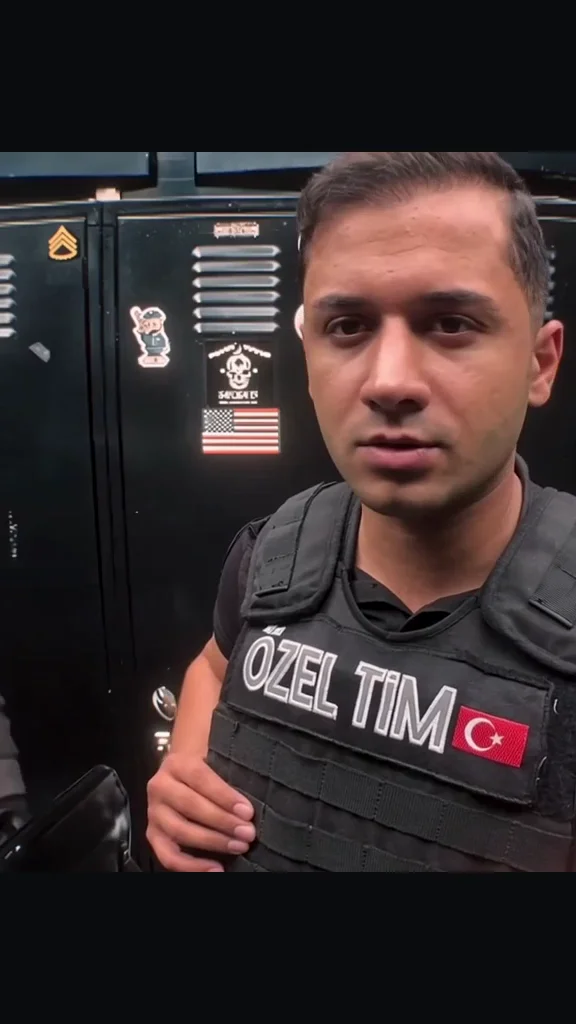
End of Watch AI — Cast Your Locker-Room Clip
End of Watch AI on Hotel Lobby AI uses one lead portrait and an optional partner photo to generate an 11-second locker-room video with the template’s sound.
Choose your photos- 1 lead + optional partner
- 11 seconds · 9:16
- Five video models
- Template sound included
End of Watch AI is for phone users casting themselves or a friend in the close-camera locker-room sequence: a sideways glance, a bright flare and props held toward the lens. One vertical MP4 costs 17 credits (about $0.63 on the lowest monthly credit rate), with five models and 480p–1080p options. The 10 signup credits do not cover a full clip. Free accounts receive a moving watermark; a purchase unlocks the clean video.
How to make your End of Watch AI video
End of Watch AI needs a clear portrait for the foreground lead. A second portrait is optional and belongs to the person behind them, on the viewer’s left. Choose the model and resolution, check the displayed credits and confirm permission. The tool handles the fixed sequence and soundtrack; watch the finished clip before saving it to your phone.
- 01
Assign the two roles
Put the main portrait in Lead. Add a different adult in Partner, or leave that slot empty.
- 02
Choose your quality
The default is Seedance 2.0 Mini at 480p for 17 credits. Every option makes the full 11 seconds.
- 03
Review, then download
Check both faces, hands and the sound through the closing gesture. Download the MP4 or reopen it from recent videos.
End of Watch videos to preview
This eleven-second locker-room take shows the exchange the template asks the model to follow. The lead turns toward a partner behind the left shoulder, then brings a flashlight-equipped prop, cuffs, wallet and radio toward the camera. Play with sound and watch through the final gesture. Generated faces, hands and prop details can differ from the preview.
Which photos fit the End of Watch AI template?
The End of Watch AI template works from separate portraits, with a clear face and visible shoulders in each picture. The prompt asks the model to use the face, hair, build and upper-body outfit from each photo while following the locker-room timing. Put the person you want in the close-up first. Use an unobstructed second portrait for the brief glance behind them; results vary with the photo and model.
| Upload slot | Role in the clip | Photo checklist |
|---|---|---|
| Lead · required | Foreground, addressing the camera and showing the props | One adult, face and shoulders visible; include the outfit you want |
| Partner · optional | Behind the lead, entering on the viewer’s left | A different adult; separate photo, no group crop needed |
Do I need an End of Watch app?
An End of Watch app download is unnecessary for this generator: open the page in a phone or desktop browser, choose photos and generate after signing in. The result is a downloadable MP4 for your camera roll or editor. Add captions in your usual editing app after export. This page makes the prepared locker-room scene; it does not stream the film or supply a timeline editor.
End of Watch AI pricing & credits
End of Watch AI generation costs 17–474 credits per 11-second video. The default Mini 480p clip uses 17 credits, about $0.63 at the $0.03718 monthly credit rate. From zero balance, the smallest purchase is $5 for 24 credits, covering 1 at the default settings. Previews cost nothing; the table shows every supported model and resolution.
| Model | Resolution | Credits / 11 s | Monthly credit equivalent |
|---|---|---|---|
| Seedance 2.0 Mini | 480p | 17 | $0.63 |
| Seedance 2.0 Mini | 720p | 36 | $1.34 |
| Seedance 2.0 Fast | 480p | 36 | $1.34 |
| Seedance 2.0 Fast | 720p | 76 | $2.83 |
| Seedance 2.0 | 480p | 60 | $2.23 |
| Seedance 2.0 | 720p | 127 | $4.72 |
| Seedance 2.0 | 1080p | 320 | $11.90 |
| Seedance 2.5 | 480p | 86 | $3.20 |
| Seedance 2.5 | 720p | 193 | $7.18 |
| Seedance 2.5 | 1080p | 474 | $17.62 |
| MiniMax H3 | 720p | 85 | $3.16 |
| Access and downloads | Details |
|---|---|
| Signup credits | The 10 signup credits do not cover a full clip. Signup credits expire after 3 days. |
| Site watermark | Free accounts receive a moving watermark; a purchase unlocks the clean video. |
| Failed generation | Provider rejection, failed generation or a returned video that fails our duration, resolution or motion checks refunds credits. If an accepted video cannot be saved or finished, credits are not refunded; contact support to recover it. |
What this template cannot do
End of Watch AI uses one fixed locker-room sequence. There are no controls for replacing the room, changing the props, adding a third person or rewriting the dialogue. The prompt asks for consistent identities and inert props, but generation can alter faces, fingers or objects and may be rejected by the model. Review the whole clip before sharing, and label an AI-made scene clearly.
End of Watch AI questions
Do I need to sign in before uploading?
You can select and preview photos before signing in. They stay in this browser until you sign in and choose Generate; original-photo drafts expire after 24 hours. Sign in to pay credits and reopen your videos.
What happens if I leave Partner empty?
The prompt asks the model to invent a separate adult for the rear role. It does not use the lead photo for both people. Add a different portrait if you want a particular friend behind the lead.
Can I use my own voice or song?
This template has no audio upload. The export uses the sound from the prepared eleven-second clip, not a voice cloned from your photo. You can mute or replace it in an editor; check the rights to any music before posting or using it in an ad.
Is this the film or real police footage?
This is a fictional AI recreation of the locker-room fan-edit format associated with the 2012 film End of Watch. It is not a film-streaming service or evidence of a real event. The first fan upload and the exact origin of the circulated soundtrack are unverified.
More photo-to-video tools
Last updated