
Bigfoot AI Video Generator
Give Bigfoot a scene and a line to say. Create a short AI vlog with dialogue and forest ambience, ready to preview and download.
- 8-second clips with sound
- 9:16 or 16:9
- 6 ready-made scenes
- Private by default
Direct your Bigfoot vlog
Picking a scene only fills the form. Nothing is generated until you press Generate.
8 sec · 720p · dialogue & ambience · 1 clip
Clips are fictional AI comedy. Label them as AI-generated when you post.
Your draft is saved in this browser.
Watch a Bigfoot example
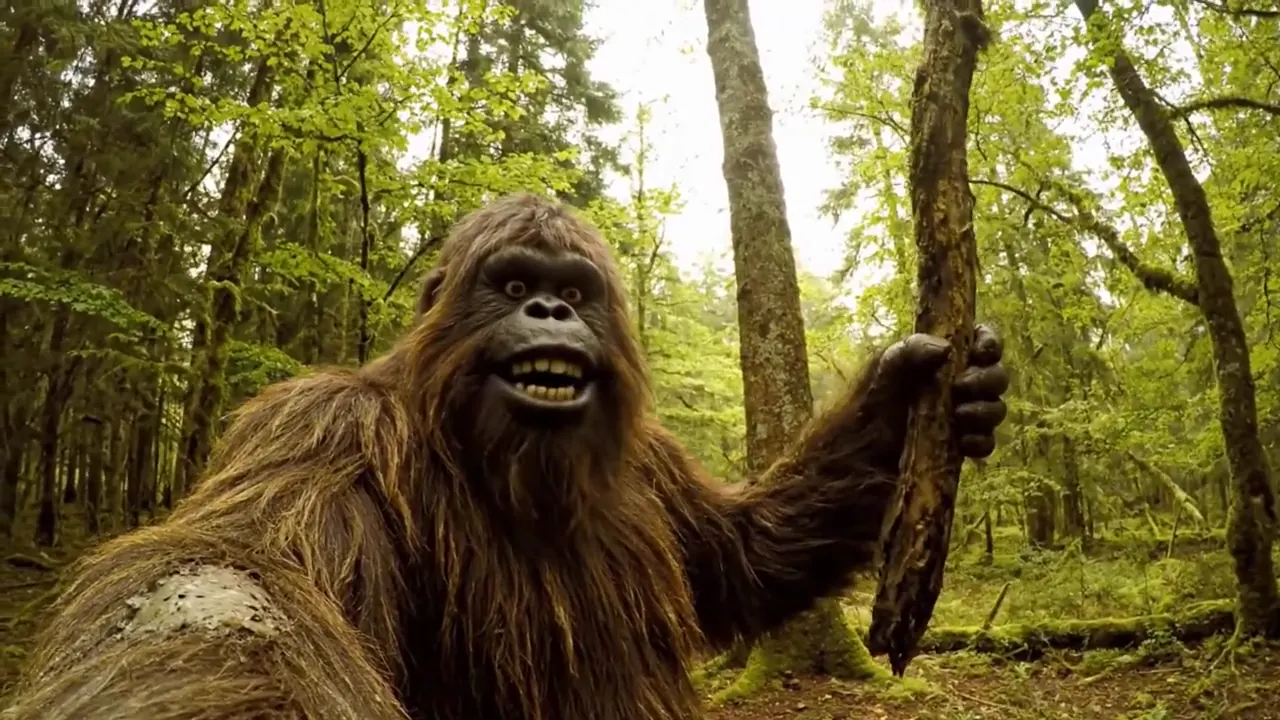
Your scene · text preview
Forest morning vlog
“Morning, humans. I found coffee. Now I understand why you keep coming back.”
9:16 · 8s · 720p
How to Make Bigfoot AI Videos
1. Pick a scene
Start from one of six scene templates, or describe one visible action yourself: a mug raised, a map unfolded, a log lifted.
2. Write one line
Give Bigfoot one short sentence to say, about 8 to 16 words, or leave it empty for a silent clip. Choose Selfie, Tripod or Trail camera and 9:16 or 16:9.
3. Generate and preview
Press Generate. The 8-second clip is made with dialogue and forest sounds, saved to your account, and ready to play and download.
Bigfoot Vlog Ideas You Can Try
Each idea fills the generator with a scene, an action, a line and a camera. Nothing is generated or charged until you press Generate.
- Selfie vlog
Forest morning vlog
Coffee mug in a misty forest at dawn.
“Morning, humans. I found coffee. Now I understand why you keep coming back.”
- Selfie vlog
Trail camera review
Bigfoot rates the camera on his tree.
“Five stars for camouflage. One star for asking me to smile every night.”
- Tripod
Campsite cooking
Forest soup, tasted on a tripod shot.
“Today we are making forest soup. The secret ingredient is absolutely not your missing snacks.”
- Tripod
Gym in the woods
One log lift and a proud grin.
“No membership fee. No mirrors. Just me, this log, and terrible counting skills.”
- Selfie vlog
Lost tourist
A paper map at a fork in the path.
“The map says you are here. Very helpful. I was hoping it knew where here was.”
- Trail camera
Trail-cam sighting
A silent wave caught at dusk.
No dialogue
These are original prompt templates. Results vary from take to take.
Write a Better Bigfoot Vlog Prompt
The generator builds the prompt for you from five parts. Knowing what each part does helps you choose a scene, an action and a line that fit an 8-second clip.
A fixed character
Rowan, an original Sasquatch with chestnut-brown fur, amber eyes and a faded teal neckerchief. Clear face traits keep him from turning into a person or an ordinary gorilla.
One camera, one shot
Say whose camera it is. For a selfie vlog, describe the view from the camera Bigfoot holds, or the model may show someone filming him from outside.
One visible action
Eight seconds fits one thing happening. Several actions compete with the dialogue and often end mid-move.
One quoted line
Put the exact words in quotes and leave a short pause before and after. Long lines get rushed or cut off.
Sound and limits
Name the ambience (birds, wind, a campfire) and rule out music, other voices, logos and on-screen text so they do not appear by accident.
Example line that fits 8 seconds
“Five stars for camouflage. One star for asking me to smile every night.”
Keep Your Bigfoot Recognizable
Every clip uses the same written description of Rowan, which keeps his fur, face and neckerchief close from one video to the next. It is a description, not a locked character: each clip is generated independently, so small differences in look and voice are normal.
For a series, reuse the same scene settings, keep the camera close, and pick the takes that match best. Character reference images are not available in this first version.
AI-Generated Bigfoot Video Examples
Explore Bigfoot vlogs, forest adventures and funny moments.
Bigfoot AI Video Generator FAQ
What is the Bigfoot AI Video Generator?
It is a text-to-video tool for short, funny Bigfoot vlogs. You choose a scene, describe one action, add an optional line of dialogue and pick a camera; it creates an 8-second clip with the voice and forest sounds in the video.
Do I need to upload a photo?
No. Everything is made from text. The character description is built in, so you only describe the scene. Reference images are not part of this first version.
How long is each video, and in what format?
Each clip is 8 seconds at 720p, one clip per generation, in 9:16 vertical (the default, for TikTok, Reels and Shorts) or 16:9 wide.
How long should Bigfoot’s line be?
One sentence of about 8 to 16 English words fits 8 seconds best. Over 20 words, the generator warns you that the line may be rushed or cut off, but it never trims your words. The template is written for English dialogue; other languages have not been verified.
Will the mouth match the words perfectly?
Not always. Syncing speech to a furry, non-human face is hard for any video model. A close Selfie or Tripod shot, an unobstructed face and one short, slow line give the best chance. Trail camera shots are silent on purpose.
Will Bigfoot look and sound the same in every video?
He will be close, because every clip uses the same character description, but not identical. Each clip is generated on its own, so fur details and voice can vary between videos.
Can I make a longer Bigfoot vlog?
Make several 8-second clips, one line each, and join them in any video editor. Continuing one clip into the next is not available yet, and separate clips may not keep exactly the same voice.
How much does it cost? Is it free?
Each clip costs 30 credits, shown next to the Generate button before you start. Credits come with the plans on the pricing page; any free credits your account has are shown in your balance.
What happens if a video fails?
If the video service fails, declines the scene, or we cannot confirm it received the request, the credits are refunded automatically. A clip that finished but is not what you wanted uses its credits; shorten the line or simplify the action and try again.
Are my videos public?
No. Your clips are private to your account: only you can play and download them, and nothing is posted to a public gallery.
Are these real Bigfoot videos?
No. Every clip is fictional AI-generated comedy. Label your videos as AI-generated when you share them, and do not present them as real sightings.
Related Video Tools
Give Bigfoot something to say
Pick a scene, write one line and make your first talking Bigfoot vlog.
Start with a scene