
Hotel Lobby AI logoHotel Lobby AI

Champagne Shoot — A Birthday Rooftop Video From One Photo

Champagne shoot by Hotel Lobby AI generates the 9-second G-Wagon roof clip from one adult photo, asking the AI to put that person on the roof.

Start with a photo
  • 1 adult photo
  • 9 s · 9:16
  • 5 models
  • Take's sound
Photo · The rider on the roof0/1

One adult, face clearly visible and facing the camera. Waist-up helps; the prompt dresses the rider in the clothes from your photo. JPG / PNG / WebP · up to 30 MB · 300–6000 px per side.

Every model makes the whole 9 s. Mini and Fast: 480p/720p; Seedance 2.0 and 2.5 up to 1080p; H3 720p only.

Video length
Resolution

Vertical 9:16 MP4 · 480 × 854 · 9 s with the take's sound

Costs 18 credits

Your photo is not published. It goes to the image and video services for the still, checks and generation only.

Preview: the same 9-second rooftop routine with another rider. The prompt asks the model for this routine, camera and sound with the person in your photo; results vary by model and photo.

Champagne shoot on this site is for making the rooftop trend as a birthday surprise or a post without filming a stunt: upload one adult's photo and get a 9-second vertical MP4 at 480p to 1080p with the original take's sound. One video costs 18 to 392 credits; new accounts may get 10 free credits, fewer than the cheapest video needs. Without a paid order the video carries a moving watermark.

How to make a champagne shoot video from one photo

Champagne shoot videos are made here in three steps: upload one photo of the adult who rides the roof, keep or change the model, and press the button. The SUV, the night highway, the moves, the camera and the sound are already set, so there is no prompt to write and nothing to film. When the 9-second MP4 is ready, it waits in your account to download.

  1. 01

    Add one adult photo

    Upload one clear photo of one adult facing the camera: yourself, or the birthday friend with their permission. Waist-up works best; the prompt dresses the rider in the clothes from the photo.

  2. 02

    Pick a model and resolution

    Seedance 2.0 Mini at 480p is the default (18 credits). Seedance 2.0 and 2.5 reach 1080p; MiniMax H3 makes 720p. The button shows the credits before you start.

  3. 03

    Download, add the birthday text, send

    Download the 9-second MP4, open it in TikTok, Instagram or CapCut, and place the birthday line over the last two seconds while the car drives away. Then post it or send it to the friend.

Champagne shoot video examples

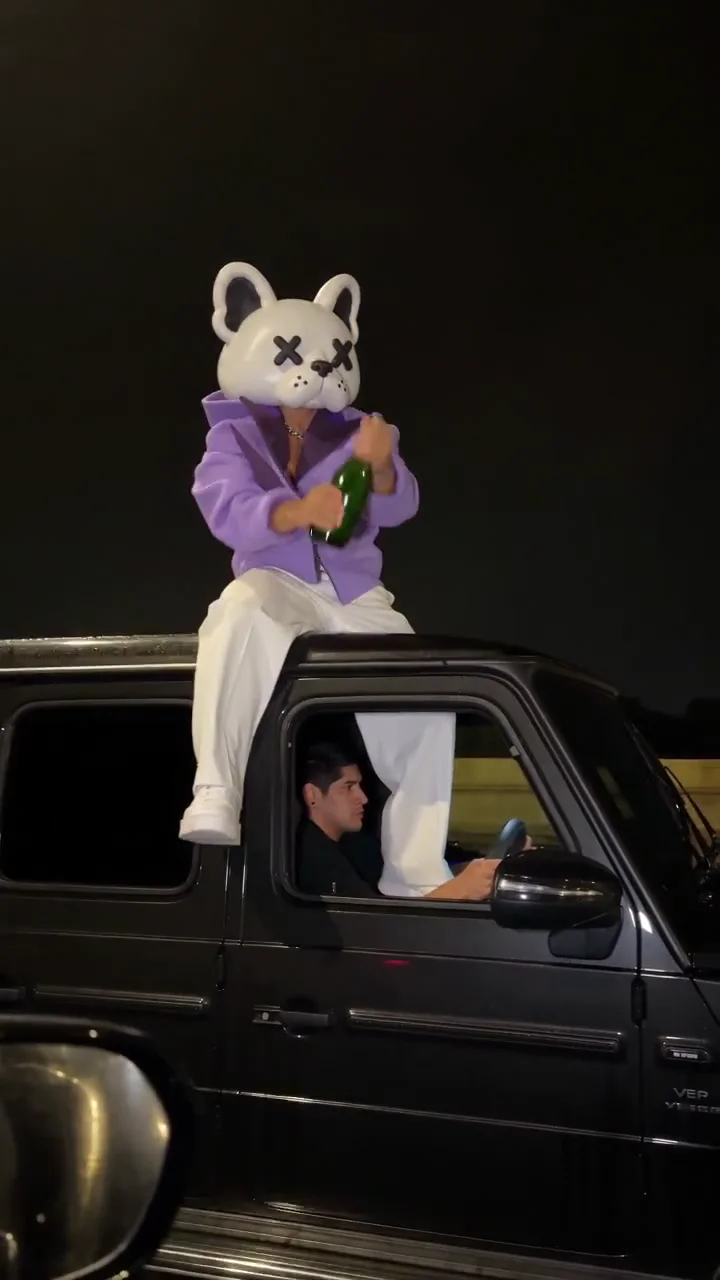
Three takes of the same 9-second rooftop routine with the same camera and sound: the shake, the spray, the sip, the throw, the burst in the sky and the drive-away. All three show a visible driver, a car badge and a number plate; your video asks for a dim driver and no badges or readable plate, so it can look different.

Rider in a bear mask and purple jacket · 9 s · with the sound
Rider in a cream suit · 9 s · with the sound
Rider in a grey tracksuit, the take most copies use · 9 s · with the sound

How do I make a champagne shoot birthday video for a friend?

A champagne shoot birthday video is made in two steps: generate the 9-second clip here from your friend's photo, then add the birthday text yourself. This tool adds no text and the prompt asks the model for none, so the name is spelled the way you type it. In the routine the car pulls away in the last two seconds, the natural spot for a "Happy Birthday" line. Ask the friend before you use their photo, and only use adults: the clip shows champagne.

StepWhat to doWhere
1. Get the photoAsk the friend for a clear, front-facing photo, or for permission to use one you haveYour phone's photos
2. Make the clipUpload the photo and generate the 9-second videoThis page
3. Add the textPlace "Happy Birthday" and the name from 7 to 9 seconds, over the drive-awayTikTok, Instagram or CapCut text tool
4. Send or postSend the MP4 in a chat, or post it and tag the friendMessages, Stories, Reels

Is there a champagne shoot app?

A champagne shoot app is not needed: this generator runs in the browser on an iPhone, an Android phone or a computer. Open the page in Safari or Chrome, upload a photo from your camera roll, sign in, and save the finished MP4 to your phone from the download button. There is nothing to install, and a subscription is optional: one-time credit packs work too.

Champagne shoot price, free credits and watermark

Not free: new accounts may get 10 sign-up credits, fewer than the cheapest video needs. One 9-second champagne shoot video costs 18 credits (Seedance 2.0 Mini 480p, about $0.67, also the default) up to 392 credits (Seedance 2.5 1080p, about $14.57). The smallest purchase from a zero balance is the $5 Trial Pack: 24 credits, enough for one default video. Every price includes the scene still and the sound. Dollar figures use the cheapest monthly credit (Pro, $29 for 780 credits), not a cash price per video.

ModelResolutionCredits · value
Seedance 2.0 Mini480p18 · $0.67
Seedance 2.0 Mini720p33 · $1.23
Seedance 2.0 Fast480p33 · $1.23
Seedance 2.0 Fast720p67 · $2.49
Seedance 2.0480p53 · $1.97
Seedance 2.0720p108 · $4.02
Seedance 2.01080p266 · $9.89
Seedance 2.5480p74 · $2.75
Seedance 2.5720p162 · $6.02
Seedance 2.51080p392 · $14.57
MiniMax H3720p (768P)74 · $2.75
ItemWhat applies
Sign-up creditsEligible new accounts may receive 10 credits, fewer than the 18 credits the cheapest video needs, so a free video is not possible. Gift credits expire after 3 days.
First purchaseThe $5 Trial Pack holds 24 credits. One Seedance 2.0 Mini 480p video uses 18, so the pack covers one; Seedance 2.5 at 480p needs 74.
WatermarkAccounts with no paid order get videos with a moving watermark. Any paid order unlocks the saved clean original, earlier videos included, without generating again.
Failures and re-dosIf the video service fails or declines the photo, the credits are refunded. If the video is made but our last step (sound and export) fails, the credits are not refunded and support finishes the video for you. Running a finished video again is a new charge.
See plans and credit packs

What the champagne shoot clip shows, second by second

The champagne shoot is a 9-second vertical night clip that spread on Russian-language Instagram in early October 2026: one person rides the roof of a moving matte-black G-Class, sprays champagne, drinks, throws the bottle and shoots it in mid-air as the car drives off. This tool's prompt asks the model for the moves below; timing can drift slightly from run to run.

TimeWhat happens
0–1.9 sSeen from a car alongside, the rider sits on the roof and shakes the bottle
1.9–3 sThe cork pops and foam blows back in the wind
3–4.3 sThe rider tips the head back and drinks
4.3–5.5 sThe bottle is thrown high; the rider raises a prop pistol
5.5–7 sOne movie-style flash bursts the bottle in the sky; the rider celebrates
7–9 sThe SUV pulls away down the wet highway, rider small on the roof

When the champagne shoot video does not work well

Champagne shoot videos work best from one clear, front-facing adult photo in even light. The prompt asks the model to keep that person's likeness and the routine, but results vary by model and photo, and the scene itself cannot be changed. These are the cases where the clip is weaker or the tool cannot help.

  • One rider only: no second person on the roof, and no pets.
  • The prop pistol shot at the bottle is part of the routine and cannot be removed or swapped for another ending.
  • The SUV, the wet night highway, the 9-second length and the vertical frame are fixed: no other car, city or 16:9 version.
  • This tool adds no text: put the birthday line or a caption on afterwards in your editor.
  • The prompt asks the model to hold the face and hands from the photo through the fast moves, the head tipped back to drink and the far drive-away shot; how well that works varies by model and photo.
  • From a head-and-shoulders photo the rest of the outfit and the shoes are invented.

Champagne shoot FAQ

Is there a gun in the champagne shoot video?

Yes. The routine ends with one movie-style shot from a prop pistol at the bottle in an empty sky, and it cannot be removed here. The prompt asks for fiction: nobody is hurt and the bottle is the only target. Some platforms limit weapon or alcohol content, so check their rules before you post.

Do I need an account to make one?

You can add the photo and see the price without an account, but generating needs a free sign-in, so the video and its credits stay with you. Your photo and settings wait on the page while you sign in.

Is my friend's photo posted anywhere?

No. The photo is not shown on this site. It is stored in private storage and sent to the image and video services through temporary links for the still and the video; anyone holding such a link could open it until it expires. The finished video stays in your account.

Can I use it for a brand or client account?

Treat it as a fun personal clip. The sound comes from the original take and its music rights are not confirmed, and the routine copies a viral video. For a brand or paid post, replace the sound with licensed audio and follow the platform's rules for AI-made and alcohol content.

Make your champagne shoot video

One adult photo, 9 seconds, the take's sound included. Check the credits on the button before you start.

Start with a photo

Last updated