
THE HOTEL LOBBY TWO-PHOTO TREND
Quavo & Takeoff AI Video Generator
Put you and a friend in the orange-studio Hotel Lobby performance. Upload one photo for each person, choose a clip length and model, and create a 720p video with the original soundtrack. The scene is already set, so you can start without writing a prompt or uploading a reference video.
Make my Hotel Lobby video- Two separate photos
- 5, 10, 15 or 30 seconds
- 720p landscape MP4
Sign in to generate. Each video uses credits; check the total before you start.
Preview of the 10-second template your photos will be placed into. The original audio is kept.
Which Quavo and Takeoff video is the AI trend based on?
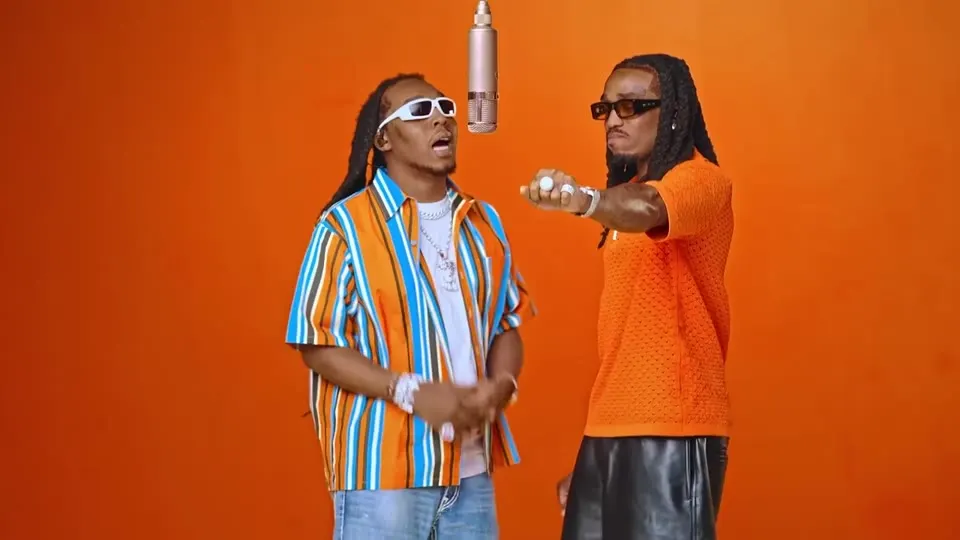
The Quavo and Takeoff AI trend recreates their “HOTEL LOBBY” performance on A COLORS SHOW with new people in the two roles. The recognizable setup is an orange studio, two performers and a microphone hanging between them. “Hotel Lobby” is the song’s name; the scene people are remaking is the COLORS performance.
If that is the clip you have in mind, this generator has the performance template built in. Your two photos tell it who should appear on the left and right.
Watch Quavo & Takeoff’s original COLORS performanceYou may also see this called the Migos AI trend. For this two-person orange-studio format, the names point to the same reference performance, although different tools can produce different kinds of video.
Know which video you are watching
- Original performance
- The linked COLORS video featuring Quavo and Takeoff.
- Template preview
- The selected excerpt shown in this generator, before your photos are used.
- Your AI video
- The result made after you submit your two photos. It appears in the generator when ready.
What changes when you put yourself in the video?
Choose the person for each side. The AI uses those photos to create your version of the two-person performance, guided by the built-in reference clip.
- Left performer
- Uses the photo in the Left person slot as its reference.
- Right performer
- Uses the photo in the Right person slot as its reference.
- Setting and movement
- Follow the fixed orange-studio performance template.
- Sound
- Uses the original reference soundtrack. You do not record a voice or choose a new song.
- Download
- A 1280 × 720 MP4 in 16:9 landscape, at your selected clip length.
This is an AI-generated visual performance. Faces, clothing, hands and lip sync can vary, so preview both people before sharing the result.
Does it make a new Quavo or Takeoff song?
No. This tool keeps the reference audio. It does not write lyrics, make a new rap or clone anyone’s voice. If you want the familiar performance with your own two people in it, use the generator above.
How to make a Quavo and Takeoff AI video with your photos
- 01
Choose who goes on each side
Upload one clear photo to Left person and another to Right person. You and your friend can take the photos separately. Check both previews so each image is in the slot you intend.
- 02
Select your clip and check the cost
Choose 5, 10, 15 or 30 seconds and one of the four Seedance models shown in the generator. Sign in and check that your eligible balance covers the displayed quote before generating.
- 03
Preview and download your MP4
When the video is ready, watch the faces, movement and sound, then download it. To use the landscape clip in a vertical post, place the whole video on a vertical canvas in your editor so both performers remain visible.
Start with two clear photos
Give each person a separate image with a visible face and even lighting. A front-facing photo with some of the upper body in frame gives the model more useful reference than a tiny face cropped from a screenshot.
- Use JPG, PNG or WebP, up to 20 MB per image, with a shorter edge of at least 300 pixels.
- Avoid covered faces, heavy filters, extreme side profiles and blurry images.
- If you start with a group photo, crop each person into a separate file first.
You can also use your own photo in both slots to try playing both roles. Use photos you have permission to use, and identify shared results as AI-generated.
See the complete photo requirementsCheck the credits before you create
Each video costs credits based on its model and length. The generator shows the total before you start. Signup offers depend on current eligibility and settings; a signup balance does not necessarily cover a complete video.
Current credit and download conditions
Each video uses credits according to its length and model. Eligible new accounts can receive up to 10 signup credits; eligibility checks apply. Signup credits are valid for 3 days. A 5-second Seedance 2.0 Mini video currently costs 12 credits. A free balance covers a video only when it meets the full quote. The current signup offer alone is below the lowest video quote, so it does not cover a complete generation.
Accounts without a paid order receive a moving site watermark. Any purchase unlocks watermark-free downloads, including earlier videos when their clean original is available. You do not need to generate those eligible videos again.
If a generation job fails, its charged credits are returned automatically. A completed video with an appearance you dislike is different from a failed job, and making another version uses credits.
Quavo & Takeoff AI video questions
What is the Quavo and Takeoff AI trend?
It is the orange-studio Hotel Lobby performance remade with new people in the two roles. The reference is Quavo and Takeoff’s A COLORS SHOW performance. On Hotel Lobby AI, you provide two photos and use the built-in template to make your version.
Can I use one photo of me and my friend?
The generator needs two image uploads. Crop each person from the group photo into a separate image, then place one in each slot. Each crop must meet the size requirements. If the faces become too small or blurry, use separate original photos instead.
Do I need a prompt, CapCut template or reference video?
No. The performance template is already built into this tool. Upload the two photos, select the clip length and model, and check the credit quote. There is no prompt field or reference-video upload to prepare.
Can I make a Quavo Takeoff AI video for free?
Each video uses credits according to its length and model. Eligible new accounts can receive up to 10 signup credits; eligibility checks apply. Signup credits are valid for 3 days. A 5-second Seedance 2.0 Mini video currently costs 12 credits. A free balance covers a video only when it meets the full quote. The current signup offer alone is below the lowest video quote, so it does not cover a complete generation.
Can I download my video without a watermark?
Accounts without a paid order receive a moving site watermark. Any purchase unlocks watermark-free downloads, including earlier videos when their clean original is available. You do not need to generate those eligible videos again.
Can I make it vertical for TikTok or Reels?
This generator exports 16:9 landscape video at 1280 × 720. For a vertical post, use an editor with a vertical canvas and keep the entire landscape frame visible. Cropping straight into the center can cut out one of the performers.
Is this an official Quavo, Takeoff or COLORS tool?
No. Hotel Lobby AI is an independent service and is not affiliated with Quavo, Takeoff, Migos or COLORS. The original performance is credited above. Including its soundtrack in an output does not provide a separate music license for your use.
Put your duo in the Hotel Lobby performance
Choose two clear photos, decide who goes on each side, and check the quote for your clip. Your version starts in the generator above.
Make my Hotel Lobby video