
Goodbye GTA 5 AI Video: Be the Traveler, in Your Own Look
Goodbye GTA 5 AI by Hotel Lobby AI asks a video model to cast you as the pier-farewell traveler, in your own clothes or a look you describe.
Add your photo- 1 photo + optional look picture
- 15 s ending or 29 s scene · 4:3
- Seedance 2.5
- Template clip's soundtrack
Goodbye GTA 5 AI is for GTA players who want the farewell to look like them or their in-game character. One photo sets the face; the You card asks the model for your photo's clothes, the Custom card for an outfit you describe. A 15-second 4:3 video costs from 120 credits (about $4.46). The 10 signup credits do not cover one video. Free accounts get a moving watermark; any purchase unlocks the clean file.
How to make a Goodbye GTA 5 AI video
The generator runs in a phone or desktop browser. Pick the traveler look before anything else, because it decides what the prompt asks the model to dress you in; length and model only change how much of the scene you get and what it costs.
- 01
Add one photo and pick a look
Upload a clear photo of one adult. Keep You for the clothes in the photo, or choose Custom look, describe the outfit and optionally add a picture of it.
- 02
Choose length and quality
Seedance 2.5 at 480p makes the 15-second ending for 120 credits by default. Switch to 29 s for the whole scene, or to 720p or 1080p for a sharper video.
- 03
Check the close-up, then download
Watch the tearful close-up and the key handover before you post, then download the MP4 or reopen it later from your recent videos.
What is the Goodbye GTA 5 AI video?
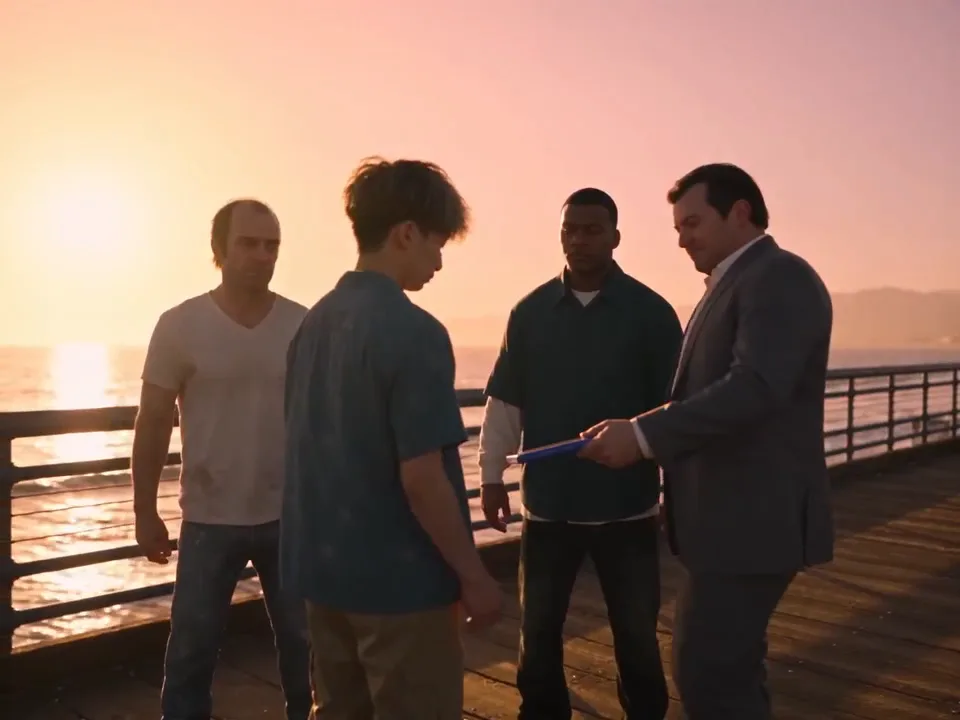
Goodbye GTA 5 AI, also called Goodbye GTA V AI or GTA 5 farewell AI, is an AI-made farewell scene shared as GTA 6 approached: on a wooden pier at sunset, a traveler meets three men styled like the GTA 5 leads, takes a game case and car keys, is patted on the shoulder, cries in a close-up and drives off in a pink sports car while the three watch. Remakes keep that scene and its music and put someone else in the traveler's place.
The first clip is the template the generator follows. The other four keep the same shots, three men, pier, car and music, and change only the traveler.
Is Goodbye GTA 5 AI a GTA 5 AI mod?
Goodbye GTA 5 AI is not a GTA 5 AI mod and does not touch the game. Searches for a GTA 5 AI mod usually mean in-game driving or traffic mods for the PC version. This page makes a separate MP4 video from your photo in the browser, with nothing to install, and it is also different from GTA-style AI filters that only turn a selfie into a loading-screen picture.
GTA 5 farewell AI traveler looks: you or a custom outfit
Two traveler cards set the look. You asks the model to copy your face, hair and the clothes in your photo through every shot. Custom look asks the model to keep your face from the photo and dress you in the outfit you type; an optional look picture can show the clothes. Neither card asks for changes to the three men, the pier or the pink car; results vary by model and photo.
| What you want | Card | What to type or add |
|---|---|---|
| Yourself, as you are today | You | Nothing; use a photo that shows the outfit you want on screen. |
| Your GTA Online character's outfit | Custom look | Describe it, for example "white tank top, gold chain, red bandana", or add a screenshot of the outfit as the look picture. |
| A heist-night suit | Custom look | "Black suit, open white shirt, aviator sunglasses". |
| A 2013 launch-night throwback | Custom look | "Grey hoodie, backpack, headphones around the neck". |
Describe clothes, colours and accessories in the look text (3–300 characters). Results vary by model and photo; the prompt asks the model to take your face from the photo, not from the look picture.
Goodbye GTA V AI length: the 15-second ending or the 29-second scene
Goodbye GTA V AI videos come in two lengths here, both on Seedance 2.5. The 15-second option is the ending, from the shoulder pat to the aerial drive. The 29-second option is the whole scene from the pier handshake.
| Length | What the reference clip covers | Models |
|---|---|---|
| 15 s · the ending | Shoulder pat, tearful close-up, cases on the car seat, the three men watching, aerial drive | Seedance 2.5 |
| 29 s · whole scene | Pier handshake, game case, car keys, the group at the railing, then the full ending | Seedance 2.5 |
Goodbye GTA 5 AI price, free credits and watermark
Goodbye GTA 5 AI is not free to generate on Hotel Lobby AI: each video costs 120–1286 credits. The cheapest is the default, Seedance 2.5 15 s 480p, at 120 credits (about $4.46 at the $0.03718 monthly credit rate). From zero balance the smallest purchase that covers one video is the $12 pack with 220 credits. Watching examples costs nothing.
| Model | Length | Resolution | Credits | Monthly credit equivalent |
|---|---|---|---|---|
| Seedance 2.5 | 15 s | 480p | 120 | $4.46 |
| Seedance 2.5 | 15 s | 720p | 270 | $10.04 |
| Seedance 2.5 | 15 s | 1080p | 665 | $24.72 |
| Seedance 2.5 | 29 s | 480p | 232 | $8.63 |
| Seedance 2.5 | 29 s | 720p | 521 | $19.37 |
| Seedance 2.5 | 29 s | 1080p | 1286 | $47.81 |
| Access and downloads | Details |
|---|---|
| Signup credits | The 10 signup credits do not cover one video. Signup credits expire after 3 days. |
| Site watermark | Free accounts get a moving watermark; any purchase unlocks the clean file. |
| Phone browser | Works in mobile Safari and Chrome; no app to install. |
| Failed generation | A rejected photo, a provider failure or a video that never arrives refunds the credits. If the model delivered the video and only saving or finishing it fails, credits are not refunded; contact support to recover it. |
What the GTA 5 farewell AI generator cannot do
The generator follows one fixed farewell scene; these requests are outside what it offers, and the prompt cannot guarantee the rest.
| Request | What happens |
|---|---|
| Two friends as two travelers | The tool asks the model to replace one person; one photo per video. |
| Vertical 9:16 | Output is 4:3 like the template clip; crop in an editor if you need vertical. |
| A different place or other characters | The prompt asks the model to keep the pier, three men and pink car; Custom only asks for a different outfit. |
| Exact likeness in every shot | The prompt asks for your face in every shot; likeness can vary from shot to shot, by model and photo. |
| Your own song or voice | No audio upload; the video gets the template clip's soundtrack. |
| Photos the model rejects | Seedance 2.5 reviews the photo first; a rejected photo fails the job and refunds the credits. |
Where the Goodbye GTA 5 trend comes from
GTA 5 came out in 2013, and the farewell clips were shared as players looked ahead to GTA 6. The clip is AI-made, not game footage or a Rockstar video, and its first creator is not confirmed.
Farewell video questions
Do I need an app to make it on my phone?
No app is needed. The generator runs in mobile Safari or Chrome: add a photo from your camera roll, sign in, generate and save the MP4 back to the phone.
Is this an official Rockstar or GTA video?
No. Goodbye GTA 5 AI on Hotel Lobby AI is an independent tool with no connection to Rockstar Games or Take-Two. The three men are styled like the game's leads in the trend clip, and the result is a fan-made AI video.
Can I post the video or use it in ads?
Posting a personal fan video is common, but label it as AI. The scene borrows GTA characters' look and the clip's music, so do not use it in ads or paid promotions without the rights.
What happens to my photo?
Your photo is uploaded only when you press Generate, stored in private storage and sent to the video model through signed links for this one job. It is not shown on the site or used in any gallery.
More photo-to-video tools
Last updated