
AI Character Swap — Recast Your Own Short Video
AI character swap on Hotel Lobby AI requests a new character in your short video, following its performance; the selected clip’s audio is restored.
Set up your character replacement
Confirming your account…
AI character swap on Hotel Lobby AI is for creators editing a short video with a character picture. The prompt requests a new appearance while following the performance; selected audio is restored. Output is a 5–30 second MP4 up to 1080p, from 40 credits (about $1.49). The current sign-up gift is 10 credits, which does not cover one complete video. A moving watermark applies until your first purchase.
How AI character swap works
Start with a short video and a clear character image, then choose the section you want to edit. You can prepare the inputs and compare prices before signing in. The model is asked to follow the selected performance; review the finished picture and its sound before sharing it, because a generated replacement can change visual details.
- 01
Choose your footage
Upload an MP4 or MOV, 5 seconds to 5 minutes and up to 50 MB, or browse 24 built-in people clips. Pick a 5, 10 or 15 second window; Seedance 2.5 also supports 30 seconds.
- 02
Add one or two characters
Use JPG, PNG or WebP images up to 10 MB each, 300–6000 pixels per side. For your own clip, image 1 requests the most prominent person and image 2 the next person; an optional note can specify another order.
- 03
Check settings and credits
Seedance 2.5 starts at 10 seconds and 480p. Choose the length and resolution in the open controls. The output shape follows the selected footage; the exact credit quote appears before submission.
- 04
Generate, review and download
Sign in, confirm your permission to edit the material and generate. The selected section’s existing audio is added to the finished video. Inspect the replacement, then download the MP4; the current watermark policy is listed below.
Short-video character replacement examples
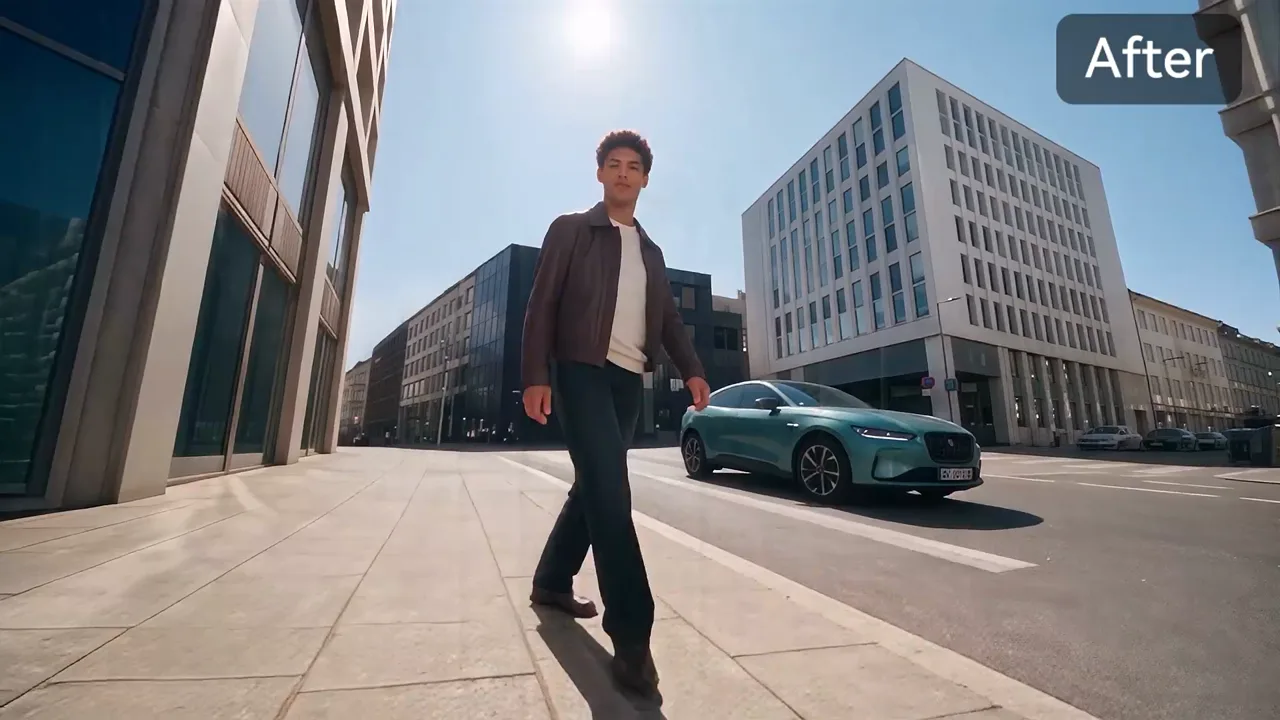
These comparisons show a person in a clip and a different appearance across the corresponding shot. Some include a character picture beside the footage, so you can inspect movement and background details yourself. They illustrate several kinds of short edit, rather than a single fixed scene; your result depends on your inputs and chosen model.
8 seconds. A street selfie before-and-after comparison shows two different characters walking through the corresponding setting.
About 9 seconds. The gold-dress dancer, a character picture and a white-dress version appear together beside the party balloons.
About 5 seconds. A hiker steps down a boulder; the comparison changes the dark outfit to a cream-clothed character.
About 7.6 seconds. A room dance is paired with a character picture and a grey-hoodie version of the performer.
About 4.9 seconds, silent. A man at a café table is paired with a woman from the inset portrait in the corresponding setting.
Can I use AI character swap online without an app?
AI character swap on Hotel Lobby AI works in a phone or desktop browser: choose a video from your files, add character pictures and sign in to generate. No app installation is needed. Uploads may be up to five minutes, but each generation edits only the selected 5–30 second window. Choose a shorter window when you only need one moment for a social clip.
What does AI body swap change beyond a face?
AI character swap requests the pictured face, hair, body shape and clothing throughout the selected video. A face swap usually changes the face alone; an outfit edit requests different clothes while leaving the wearer’s identity. Here the prompt also asks for the existing movement, camera and setting. Those visual details may be redrawn, so this is not a frame-perfect background-preservation tool.
| Edit type | What the edit requests |
|---|---|
| Face swap | A different face on the existing performer. |
| Character / body replacement | The pictured face, hair, body shape and outfit. |
| Motion transfer | A new performance guided by a clip; the surroundings may be regenerated. |
The selected source audio is restored during finishing; the tool does not create a new voice or automatically match new dialogue to the lips.
Is AI character swap free?
AI character swap on Hotel Lobby AI is paid: the current sign-up gift cannot cover one video. The current sign-up gift is 10 credits, which does not cover one complete video. Gift credits expire after 3 days. Each complete video costs at least 40 credits. Dollar equivalents compare usage; they are not separately purchasable videos. From zero balance, the cheapest current purchase covering one minimum-length video is Starter monthly: $9.00/month for 240 credits. Preparing inputs and watching examples do not use credits.
Pricing & credits
Each row is the full credit charge for one video, including its selected reference section. The default 10-second Seedance 2.5 video at 480p costs 80 credits. Dollar equivalents use the lowest monthly-subscription credit rate ($0.03718 per credit); your plan may differ. The lowest-priced purchase covering one minimum-length video from zero credits is Starter monthly: $9.00/month for 240 credits.
| Model | Length | Resolution | Credits | Credit value (USD) |
|---|---|---|---|---|
| Seedance 2.5 | 5 s | 480p | 40 | $1.49 |
| Seedance 2.5 | 5 s | 720p | 88 | $3.27 |
| Seedance 2.5 | 5 s | 1080p | 216 | $8.03 |
| Seedance 2.5 | 10 s | 480p | 80 | $2.97 |
| Seedance 2.5 | 10 s | 720p | 176 | $6.54 |
| Seedance 2.5 | 10 s | 1080p | 431 | $16.02 |
| Seedance 2.5 | 15 s | 480p | 120 | $4.46 |
| Seedance 2.5 | 15 s | 720p | 264 | $9.82 |
| Seedance 2.5 | 15 s | 1080p | 646 | $24.02 |
| Seedance 2.5 | 30 s | 480p | 240 | $8.92 |
| Seedance 2.5 | 30 s | 720p | 527 | $19.59 |
| Seedance 2.5 | 30 s | 1080p | 1292 | $48.04 |
| Access | Current policy |
|---|---|
| Preparing an edit | Browse examples, select a clip and compare settings without spending credits. No free generated preview is promised. |
| Sign-up allowance | The current sign-up gift is 10 credits, which does not cover one complete video. Gift credits expire after 3 days. |
| Watermark and downloads | A moving site watermark applies before your first purchase. Any purchase unlocks the clean original, including for existing videos. |
| Purchase from zero credits | Starter monthly: $9.00/month for 240 credits |
| Small top-up pack | The $5.00 pack contains 24 credits. It needs at least 16 credits already in your balance to cover the cheapest video. |
| Failed jobs | Provider rejection or generation failure before delivery refunds the task credits. Saving or finishing failures after a video is delivered do not automatically refund; contact support to finish the existing result. |
What character replacement cannot guarantee
The model is asked to follow your footage, but identity, anatomy, contact with props, text and background details may change. This page does not promise a measured likeness score or exact choreography. It processes a selected clip, not a live camera feed or an entire five-minute upload at once. Use material you have permission to edit and inspect the completed video before publishing.
A silent input remains silent. Restoring an existing soundtrack does not give you permission to publish that music or someone else’s footage.
Character swap questions
Can I use an anime character, game character or mascot?
You can upload a clear character picture in the supported image formats. The prompt asks the model to follow its drawn or rendered style and body proportions; this does not guarantee that every design or unusual anatomy will transfer accurately. Only use character art you have permission to edit.
How do I assign two character images to two people?
For your uploaded clip, image 1 requests the most prominent person and image 2 the next one. On a built-in clip, follow its lead labels. You can add a note such as “Image 1 replaces the dancer in red; Image 2 replaces the dancer in blue.” This specifies the request, not a guarantee of identity tracking.
Can it work in real time or replace a whole long video?
No live camera or webcam mode is provided. You may upload up to five minutes of footage, then process a selected 5, 10 or 15 second window; Seedance 2.5 also offers 30 seconds. Longer stories need separate runs, and visual identity can vary between them.
Do I need an AI character swap prompt?
A written instruction is optional when you have added your character picture. Use it to identify the performer or describe a detail, for example “Image 1 replaces the speaker on the left.” If entered, the note must be 3–800 characters; the server adds the motion and character instructions.
Last updated