
INVISIBLE MOPED AI · A CRAZY FROG AI SERIES
Invisible Moped AI: One Chase, a New Rider Every Post
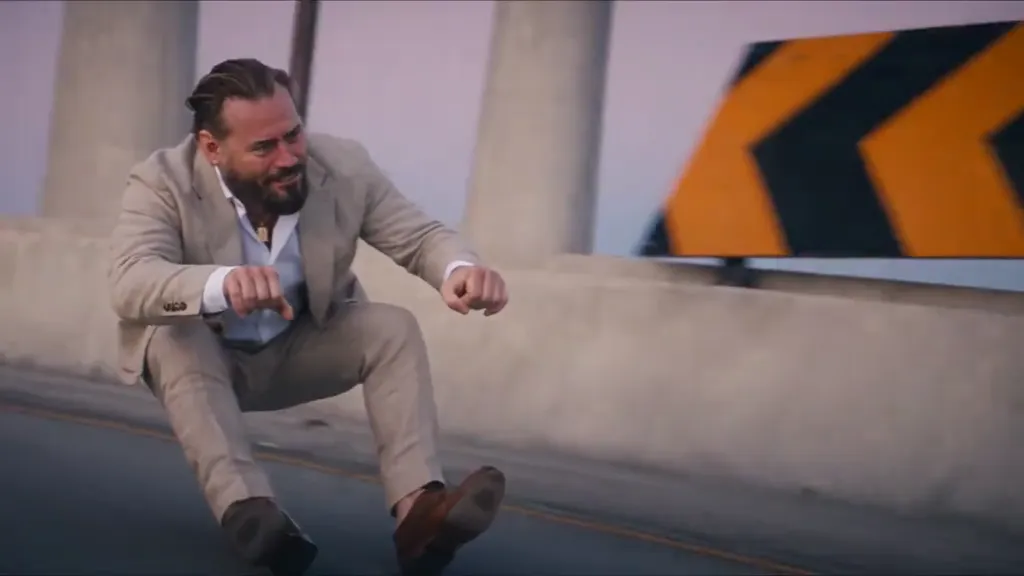
Invisible moped AI is the October 2026 Crazy Frog AI trend: a real person crouches in mid-air on a moped that isn’t there, a cop on a white hover-bike gives chase, and the rider gets away. Upload one photo, or two so a friend plays the cop, and you get the same 15-second chase every time, so you can post it as a series with a different rider in each episode.
Start episode one- 1–2 photos · people or pets
- The same 15-second chase every time
- 9:16 by default, 16:9 too
- From 27 credits
15 s with sound · 9:16 or 16:9 · 1–2 photos · overpass, neon city, supermarket or your own place · five models · from 27 credits · moving watermark until your first paid order · failed runs refunded
What is invisible moped AI?
Invisible moped AI, invisible motorcycle AI and Crazy Frog AI all name one short clip: someone races down a road in a seated crouch, fists on handlebars that do not exist. The Crazy Frog part comes from the animated character whose 2005 “Axel F” video ends in a chase, and whose sound began in 1997 as a Swedish teenager imitating a moped engine. In October 2026 AI remakes put real people in that seat; the version most remakes follow is @wdmowski’s overpass chase, posted on TikTok on 12 October.
- What happens
- About 15 seconds: the rider glides along in a crouch, the camera cuts to the cop’s face behind the hover-bike’s twin lights, the rider looks back and throws both hands up, then shoots off down the road with the cop still following.
- Where it came from
- A 1997 moped-noise recording, Erik Wernquist’s animation “The Annoying Thing” (2003), Crazy Frog’s “Axel F” (2005), then AI remakes on TikTok in October 2026: one of the first by @tonnatusha on 7 October and the overpass chase by @wdmowski on 12 October.
- Also called
- Crazy Frog AI, invisible motorcycle AI, invisible bike AI video, the Crazy Frog race. Nobody turns into a frog.
- What this page makes
- That chase from your photo: a fixed 15 seconds with the trend’s soundtrack, four places, five video models, solo or with a friend as the cop. Because the shots and timing never change, it suits a series.
Invisible moped AI examples: the original and three remakes
The first clip is the TikTok post the trend copies; the other three come from other generators. Each follows the same beats and soundtrack as the chase this tool uses. None was made on this site, and their quality is not a promise about your result.
The overpass original
Source: @wdmowski on TikTok
The same chase in a rainy neon city
Source: ImageLayered
The same rider back on an overpass
Source: Frog Race AI
A friend on the hover-bike as the cop
Source: Media.io
Cast your invisible moped series: who rides, who chases
Every episode has two parts: the rider on the invisible moped and the cop on the hover-bike. Decide who plays which before you upload, and keep a list so viewers can follow the series.
| Setup | Photos | What you get | Good for |
|---|---|---|---|
| One rider | 1 photo (Solo) | Your photo rides; the cop is generated | A daily post with a new rider each day |
| A friend as the cop | 2 photos (Duo) | Photo 1 rides, photo 2 chases | Couples, siblings, rivals, two separate selfies |
| Chasing yourself | The same photo twice | One person plays both roles | A twist episode |
| A pet on the moped | 1–2 photos | A clear dog or cat photo rides; a person or another pet can chase | Pet accounts |
| The rematch | Last episode’s 2 photos, swapped | Last time’s cop rides this time | Two-part episodes |
Pick Solo or Duo above the upload slots; Swap trades the two roles. Each photo is kept to its own role, but likeness is not guaranteed, so check faces before you post.
How to make an invisible moped AI series
The chase, its timing and its soundtrack are built in. A series only needs you to keep a few settings the same and change the people.
- 01
Collect the cast
Ask each person for a sharp photo facing the camera with the whole head in frame, plus their OK to post. Keep one folder per episode.
- 02
Fix the look once
Choose the frame, place, model and quality for episode one, then reuse them. Changing any of them makes that episode look different from the rest.
- 03
Generate one episode at a time
Upload the rider (and the cop in Duo), confirm you may use the photos, and press Generate. A video takes a few minutes and stays in your history here and on the Crazy Frog AI page.
- 04
Check it, then post
Watch the cuts for face changes before posting. Name files by episode and rider, add the platform’s AI label, and keep the built-in sound or swap it in the app.
What to keep and what to change
| Setting | For a series |
|---|---|
| Frame | Keep it. 9:16 for TikTok, Reels and Shorts; 16:9 if the episodes will end up in a YouTube compilation. |
| Place | Keep one, or run a season per place: overpass, neon city, supermarket or a background photo of your own. |
| Model and quality | Keep them. Seedance 2.0 Mini and Seedance 2.5 render differently, so mixing them inside one series shows. |
| Rider and cop | Change them every episode. That is the series. |
Invisible moped AI price per video
Each row is one complete 15-second video with sound. Solo and Duo cost the same, and so do 9:16 and 16:9.
| Model | Length | Quality | credits | Monthly-credit equivalent |
|---|---|---|---|---|
| Seedance 2.0 Mini | 15s | 480p | 27 | $1.00 |
| Seedance 2.0 Mini | 15s | 720p | 52 | $1.93 |
| Seedance 2.0 Fast | 15s | 480p | 52 | $1.93 |
| Seedance 2.0 Fast | 15s | 720p | 108 | $4.02 |
| Seedance 2.0 Pro | 15s | 480p | 85 | $3.16 |
| Seedance 2.0 Pro | 15s | 720p | 178 | $6.62 |
| Seedance 2.0 Pro | 15s | 1080p | 440 | $16.36 |
| Seedance 2.5 | 15s | 480p | 121 | $4.50 |
| Seedance 2.5 | 15s | 720p | 266 | $9.89 |
| Seedance 2.5 | 15s | 1080p | 468 | $17.40 |
| MiniMax H3 | 15s | 720p | 120 | $4.46 |
Dollar equivalents use the Pro monthly plan: $29 for 780 credits. They show the value of credits used, not a cash price for buying a single video. Check the actual purchase options below.
Free credits, Trial Pack, watermark and refunds
| Signup credits | Eligible new accounts receive 10 credits, valid for 3 days. The cheapest video needs 27 credits. The signup grant alone does not cover a full video. |
|---|---|
| Trial Pack | The $5 one-time pack contains 24 credits. It is insufficient alone, but it can cover one lowest-setting video when combined with at least 3 still-valid signup or existing credits. |
| Enough credits without a signup grant | The lowest monthly option with enough credits is $9 for 240 credits (renews monthly). The lowest sufficient one-time pack is $12 for 220 credits. |
| Watermark and download | Accounts with no paid order receive a moving site watermark. Any paid order unlocks their clean originals, including earlier videos. Downloading the finished MP4 has no extra fee. |
| Failure or another attempt | A final generation failure refunds the charged credits. A completed video with an unwanted face, pose or expression is not an automatic free retry; starting again uses the displayed credits. |
Budget a series: 3, 7 or 30 episodes
Plan on re-running about one episode in three: a failed task is refunded, but a finished video you don’t like is not. The table adds that allowance and shows the cheapest monthly plan and one-time pack that cover it.
| Series | Model · quality | Videos incl. re-runs | Credits | Cheapest monthly plan | Cheapest one-time pack |
|---|---|---|---|---|---|
| Weekend challenge (3) | Seedance 2.0 Mini · 480p | 4 | 108 | $9/month (240 credits) | $12 (220 credits) |
| Weekend challenge (3) | Seedance 2.5 · 480p | 4 | 484 | $29/month (780 credits) | $29 (580 credits) |
| Weekend challenge (3) | Seedance 2.5 · 720p | 4 | 1,064 | $99/month (2,650 credits) | $99 (2,050 credits) |
| A week of daily posts (7) | Seedance 2.0 Mini · 480p | 10 | 270 | $29/month (780 credits) | $29 (580 credits) |
| A week of daily posts (7) | Seedance 2.5 · 480p | 10 | 1,210 | $99/month (2,650 credits) | $99 (2,050 credits) |
| A week of daily posts (7) | Seedance 2.5 · 720p | 10 | 2,660 | More than the largest single plan; split it across months or packs | More than the largest single plan; split it across months or packs |
| A month of daily posts (30) | Seedance 2.0 Mini · 480p | 40 | 1,080 | $99/month (2,650 credits) | $99 (2,050 credits) |
| A month of daily posts (30) | Seedance 2.5 · 480p | 40 | 4,840 | More than the largest single plan; split it across months or packs | More than the largest single plan; split it across months or packs |
| A month of daily posts (30) | Seedance 2.5 · 720p | 40 | 10,640 | More than the largest single plan; split it across months or packs | More than the largest single plan; split it across months or packs |
One re-run per three episodes, rounded up. Signup credits are not counted. Monthly plans renew; one-time packs do not.
Two people in one chase without swapped faces
Duo mode gives each photo its own role, which is what keeps two faces apart. Most mix-ups start with the photos themselves.
- Use two separate one-person photos. In a group photo the wrong face can end up in a role.
- Pick photos with similar light and sharpness; a blurry cop photo drifts toward the rider more easily.
- Check which photo sits in which slot before you generate. Swap fixes a wrong order.
- Two friends with similar hair and clothes are the hardest pair. A hat, a bright jacket or glasses in one photo makes a mix-up easy to spot.
| What you see | Likely cause | What to try |
|---|---|---|
| Faces trade places after a cut | Look-alike photos, or the roles were uploaded in the wrong slots | Check the slots, give one role a more distinctive photo, run it again |
| The cop looks like the rider | A dark, small or side-on cop photo | Use a sharp photo of the cop facing the camera |
| You wanted two riders side by side | The tool always makes one rider and one cop | Make one Solo episode per friend and cut them together |
| A real moped shows up under the rider | An occasional model error | Run it again; a waist-up or full-body photo with both arms visible gives the pose more to work with |
A final generation failure refunds the charged credits. A completed video with an unwanted face, pose or expression is not an automatic free retry; starting again uses the displayed credits.
From clips to daily posts or a compilation
Decide where the series will live before episode one, because the frame is chosen when you generate.
| Where | Frame | Tip |
|---|---|---|
| TikTok | 9:16 | Turn on the AI-generated content label for realistic AI video. |
| Instagram Reels | 9:16 | Put the rider’s name in the caption rather than over the bottom of the video, where the app’s buttons sit. |
| YouTube Shorts | 9:16 | Answer YouTube’s altered or synthetic content question when you upload. |
| YouTube compilation | 16:9 | Generate the whole series in 16:9 from the start; vertical clips in a wide video leave black bars. |
Regenerate, don’t crop
Cropping a 16:9 episode to 9:16 keeps only a narrow middle strip and can cut off the cop at the edge of the frame. If you need both shapes, make each one: 9:16 and 16:9 cost the same here.
Keep a compilation from feeling repetitive
The chase is identical on purpose, so the cast carries the video. Group riders by theme (family, office, pets), change the place each season, add a name card before each clip and keep every clip at full length so the getaway lands on the music.
This chase tool vs Kling 4.0, Higgsfield Genjutsu and Seedance 2.5 for a series
Checked on 19 October 2026 against each product’s own description. It compares how much you set up per episode, not output quality; no side-by-side test with the same photo was run.
| Tool | What you supply per episode | How the chase is kept | Best for |
|---|---|---|---|
| This page | 1–2 photos | Built in: the same shots, timing and soundtrack every time | Many episodes of the same chase |
| Kling 4.0 (Kuaishou, released 15 October 2026) | Photos, a reference video and your own prompt | Follows the motion and camera of a reference video you provide | Custom remakes when you have a reference clip you may use |
| Higgsfield Genjutsu | A reference video plus the replacement character | Transfers the movement of the clip you upload | Copying one specific clip’s exact movement |
| Seedance 2.5 with your own prompt | Photos, a written prompt and optional references | Up to your prompt; it reinterprets more freely | New takes: other places, endings or characters |
| CapCut templates | Your own footage | Adds music and transitions only; no AI chase | Editing an episode after it is generated |
Want your own crouch, filmed on a phone, instead of a photo? This tool works from photos only. Genjutsu AI on this site edits a clip you upload (5–300 seconds) using reference images and an instruction, for example a new background. It changes your footage rather than adding this exact chase.
Edit your own clip with Genjutsu AIEveryone in the series says yes first
Each episode puts a real face into a realistic video. Ask every rider and cop before uploading their photo, even for a private group chat; a photo on a company website or someone’s social profile is not permission. Check the platform’s age rules and get a parent’s OK before posting anyone under 18. Your photos and finished videos are stored privately and served only to your account.
Invisible moped AI FAQ
Is there a browser tool that puts a different person on the invisible moped every day without changing the chase?
Yes, that is what this page is for. The shots, timing and soundtrack are fixed, so only the photo changes between episodes. It runs in a phone or desktop browser. Keep the frame, place, model and quality the same and each day’s rider slots into the same show.
What is the cheapest way to make three clips with friends this weekend, and will they have a watermark?
The lowest setting, Seedance 2.0 Mini at 480p, is 27 credits per clip, so three clips plus one re-run come to 108 credits. Eligible new accounts receive 10 credits, valid for 3 days. The cheapest video needs 27 credits. The signup grant alone does not cover a full video. The lowest monthly option with enough credits is $9 for 240 credits (renews monthly). The lowest sufficient one-time pack is $12 for 220 credits. Accounts with no paid order receive a moving site watermark. Any paid order unlocks their clean originals, including earlier videos. Downloading the finished MP4 has no extra fee.
We only have separate selfies. Can one of us ride and the other be the cop?
Yes. Switch to Duo, put the rider’s selfie in the first slot and the cop’s in the second. Separate selfies work better than a photo of you together, because each role gets one clear face. Use Swap for the rematch.
Why did my friend’s face and mine switch when the camera cut?
Each photo is tied to a role, but very similar photos (same hair, clothes and light) are easier to mix up at a cut, and a role uploaded in the wrong slot looks like a swap. Check the slots, give one person something distinctive and run it again. A re-run of a finished video uses credits.
Can two friends ride side by side through a neon street?
Not in one video: the tool always makes one rider and one cop. Pick the neon city place, make one Solo episode per friend and cut them together, or put one friend on the hover-bike in Duo.
How do I keep a compilation of different riders from feeling repetitive?
Let the cast do the work: same chase, a new person each time. Group riders into themes, change the place per season, add a name card before each clip and keep each clip at full length so the getaway lands on the beat. Make the whole set in one frame.
Should I regenerate in 9:16 or reframe a landscape video for TikTok, Reels and Shorts?
Regenerate. Cropping 16:9 to 9:16 keeps only a narrow middle strip, which can cut off the cop or the rider. Both frames cost the same here, so make each episode in the shape you will post.
Do I need to download the original TikTok to use as a motion reference?
No. The chase is already built in and you only upload photos, so you also avoid the question of whether you may reuse someone else’s clip.
Last updated