
Sapwa AI Video: The Talking Snake Trend
Sapwa AI video is a short-form cartoon trend about a talking green snake. This Hotel Lobby AI guide explains the meme and how to make one.

The Sapwa AI video trend
A Sapwa AI video is a short cartoon featuring a bright green, expressive snake that talks like a person. You might see it in a Hindi comedy sketch, a sad story about a friendship, or a scene with Sheru Bhai, the white lion often shown in a suit. Think of Sapwa as a recurring character in different short videos.
Many clips use the same setup: a quick conversation, a close-up of the listener’s reaction, and a punch line. Vertical framing lets the creator cut between faces without losing the expression. The same format can also carry a small emotional story.
How to make a Sapwa-style video in three shots
A Sapwa-style video starts with one original green-snake image and a scene you can tell in three shots. Reuse the same image when you animate each shot, and give only one character a line at a time. Once the shots are ready, line up the dialogue and add captions in an editor. A 9:16 MP4 fits Shorts and Reels.
- Draw or generate one character still. Save that exact file and reuse it for every shot. If you include a lion, make a separate matching still for that character too.
- Record the lines first. Leave a beat after each line so you know how much room the reaction needs. Create one 4–6 second clip per beat as a starting point.
- Animate and assemble. Feed the matching still into an image-to-video tool for each clip. Keep the same colors, eye shape and outfit, set the frame to 9:16, then place the clips and dialogue on one timeline.
A reusable character image prompt
Clay-style 3D cartoon of an original friendly emerald cobra with amber eyes, a pale yellow belly, a small rounded hood and a coral scarf. Give it one continuous coiled body and a clear, expressive face. Place it next to a terracotta cup in a sunlit village courtyard with a dusty teal door. Vertical 9:16 composition, medium shot, no lettering.
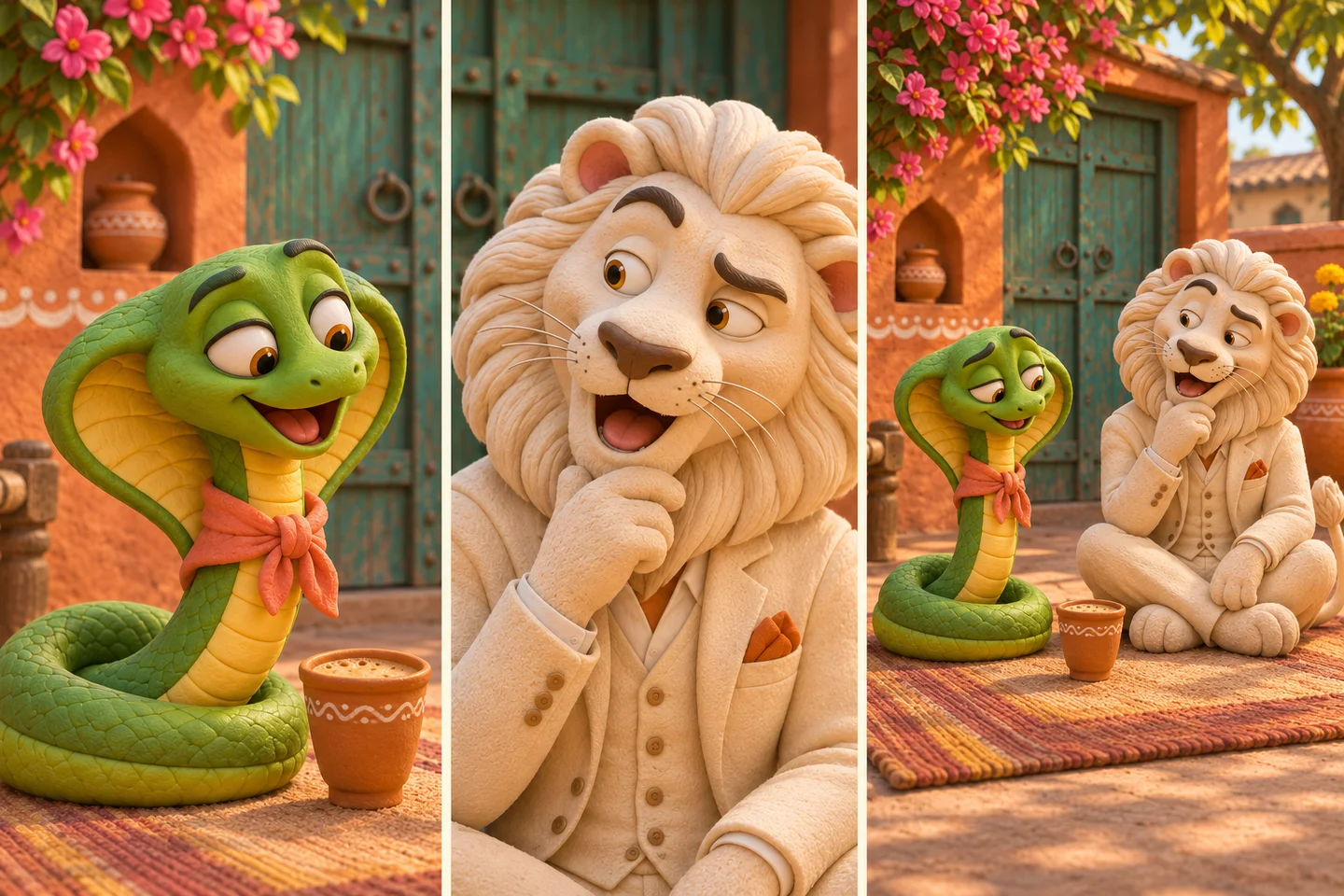
| Shot | Motion prompt and line |
|---|---|
| 1. The setup | Show the green snake raising its eyebrows at a clay cup. Only the snake moves its mouth. “मेरी चाय कहाँ है?” (Where’s my tea?) |
| 2. The reaction | Cut to the white lion. It glances down and raises one eyebrow, with one brief mouth movement. “तुम्हारी पूँछ के पास।” (Next to your tail.) |
| 3. The punch line | Cut back to both characters. The snake looks down at the cup beside its tail. The lion smiles silently. Snake: “अच्छा, तभी इतनी गर्मी लग रही थी!” (Oh, that’s why I was feeling so warm!) |
Hindi dialogue and lip-sync
Sapwa-style Hindi dialogue is easiest to sync one line at a time. Use a separate recording for each line and start the mouth motion at the first syllable. Put the speaker in a close-up, then cut to the other character’s silent reaction. If the mouth keeps moving between words, trim that part or cover it with the listener’s shot. Check names and Hindi captions by hand before exporting.
When the face changes between clips, check the image inputs before rewriting the prompt. Try the same still and one small movement, such as an eyebrow raise or a glance. For a second character, label each image in your prompt and say who speaks and who stays silent.
Free guide and example edit cost
The Sapwa AI video guide, its prompts and its illustrations are free to read. Video edits in the linked Genjutsu tool use credits. For example, a 10-second Seedance 2.5 edit at 480p uses 78 credits, about $2.90 in credits at the lowest monthly rate. See current credit plans and check the editor’s exact quote before you generate.
| What you do | What it costs |
|---|---|
| Read or copy the prompts | Free, with no sign-in. |
| Edit a 10-second clip | 78 credits at 480p with Seedance 2.5. |
| Export a video | Check the editor’s current credit offer and watermark rules before choosing a plan. Your image, voice or editing tools may charge separately. |
Where the Sapwa trend appears
Sapwa appears in different public short videos and tutorials, with comedy and emotional stories using the same recognizable green-snake idea. Public uploads show the format was circulating by late October 2026, with dialogue in Hindi and, in some clips, Bhojpuri. The first uploader and date of origin are uncertain.
- The samosa seller, 23 seconds. A cartoon cobra runs a village snack cart until the customers see who is serving them.
- A snake in the forest, 11 seconds. A green cobra tells the camera it only came out to sit in the sun.
- Sapwa’s sad story, 8 seconds. A little green snake sits in a courtyard and wipes its eyes.
There are also short tutorials on making Sapwa videos.
Sapwa AI video FAQ
Is Sapwa also spelled Saanpwa?
Yes. You’ll see variants such as Saanpwa and Sanpwa. Try adding “green snake”, “Hindi comedy” or “Sheru Bhai” to narrow the results.
Can I make one on my phone?
Yes. You can plan, record and assemble the scene on a phone. Use a mobile-friendly image-to-video tool, record each Hindi line with your phone mic, then add captions in an editor. The linked Genjutsu editor opens in a browser and requires a video clip for this workflow.
Can I use the same character and audio in multiple videos?
Reuse the original character art and voice recordings that you made or have permission to use. For a public or commercial post, use music whose license covers that platform and check the rights for any clip or voice you’ve borrowed.